DNS A Record Explained
- Written by ZonWhois Editorial Team
- Published on
- In Dns Records
A DNS A record maps a domain name to a 32-bit IPv4 address, such as 203.0.113.10. Browsers and other clients look it up to find the server to connect to. An A record has a name, a value and a time to live, and a name can have several A records. For IPv6 addresses you use an AAAA record instead.

Section of: DNS Records Explained: Types and Examples
An A record is the most common DNS record, and it is one of the types listed in DNS records explained. It answers one question: which IPv4 address does this name use?
What an A record does
When a client needs to reach www.example.com, its resolver asks for the A record. The answer is an IPv4 address, and the client connects to it. RFC 1035 defines the data for the A type in the IN class as a 4-octet address.
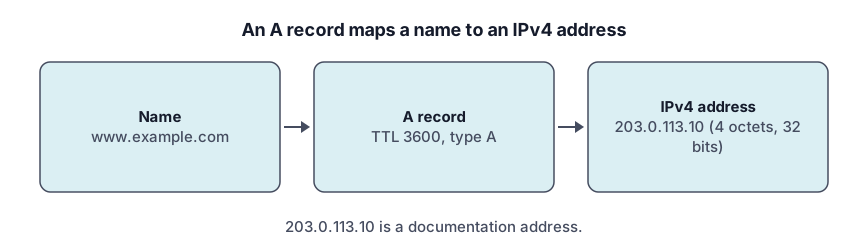
Anatomy of an A record (name, type, value, TTL)
| Field | Meaning | Example |
|---|---|---|
| Name | The owner name | www |
| Type | The record type | A |
| Value | An IPv4 address | 203.0.113.10 |
| TTL | Maximum caching time in seconds | 3600 |
The TTL range is 0 to 2147483647 under RFC 2181.
Example A records
example.com.      3600  IN  A  203.0.113.10
www.example.com.  3600  IN  A  203.0.113.10
These use a placeholder name and an address chosen for illustration. Note the trailing dot: RFC 1034 says a complete domain name ends with the root label.
How to add or change one at your DNS provider (generic steps)
- Open the DNS settings at the provider that runs your zone.
- Choose Add record and select type A.
- Enter the name (a subdomain, or the root), the IPv4 address and the TTL.
- Save. In Cloudflare’s dashboard these steps are: open DNS Records, select Add record, choose a type, complete the fields, and select Save.
Enter the address in standard dotted form; Cloudflare does not support shortened notations such as 1.1 for 1.0.0.1.
Multiple A records and round-robin
A name can have more than one A record. They form an RRset: RFC 2181 says a query always returns all records in the set and that all must share the same TTL. The specification does not say in which order a client will use them, so treat multiple records as a list of valid addresses, not as a guaranteed load-balancing scheme.
A record vs AAAA vs CNAME
- A holds an IPv4 address.
- AAAA holds an IPv6 address.
- CNAME points a name at another name, and cannot share a name with other records.
Check an A record (tool)
Query the name with the DNS lookup tool and select the A type. To go from an address back to a name, see reverse DNS and PTR records; to find out who holds an address block, see IP address WHOIS and RDAP.
Troubleshooting
- Old address still showing. The old record is cached until its TTL expires.
- Nothing resolves. Check that the zone is edited at the provider your registration’s nameservers point to.
- A CNAME on the same name. A CNAME cannot coexist with an A record on the same name (RFC 1034, section 3.6.2).
- Wrong format. Use four dotted numbers, not shortened forms.
Our sourcing approach is in the editorial policy.
Frequently asked questions
What is an A record?
An A record is a DNS record that maps a name to an IPv4 address. RFC 1035 defines its data as a 32-bit Internet address, written as four decimal numbers separated by dots. When someone visits your domain, their resolver asks for the A record and uses the address in the answer to connect.
How many A records can I have?
A name can have several A records. They form a record set, and RFC 2181 says a query always returns the whole set, with every record sharing one TTL. The specification does not guarantee the order, so do not rely on it. Your DNS provider may set its own limit on records per name.
Can an A record point to a domain name?
No. The data of an A record is an IPv4 address, not a name. To point one name at another name, use a CNAME record, which makes the first name an alias of the second. A CNAME cannot share its name with other records, so check the CNAME page before choosing between them.
What TTL should I use?
Use a TTL that matches how often the record changes. A short value lets changes spread faster, and a long value reduces queries. RFC 2181 allows 0 to 2147483647 seconds. In Cloudflare, a proxied record is set to Auto, which is 300 seconds, while DNS-only records can use a custom value.
Why does my A record not update?
Resolvers keep the old answer until its TTL runs out, so a change can take that long to show everywhere. Also check that you edited the zone at the provider that your registration's nameservers point to, and that no CNAME exists on the same name. Use the DNS lookup tool to see the current answer.
Sources and further reading
- RFC 1035: Domain names, implementation and specification (rfc-editor.org)
- RFC 2181: Clarifications to the DNS specification (rfc-editor.org)
- Cloudflare: DNS record types (developers.cloudflare.com)
- Cloudflare: Create DNS records (developers.cloudflare.com)
You might also like
- DNS Records Explained: Types and Examples
What DNS records are, how a lookup finds them, and what A, AAAA, CNAME, MX, TXT, NS and SOA records do, with examples and common mistakes.
- DNS AAAA Record: IPv6 Explained
A DNS AAAA record maps a name to an IPv6 address. See the format, how it differs from an A record, when to add one, and how to test it.
- DNS CNAME Record Explained
A DNS CNAME record makes one name an alias of another. Learn the rules, why it cannot sit at the root, CNAME vs A record, and how to fix conflicts.
- DNS MX Record Explained
A DNS MX record names the mail exchange for a domain and a priority number. Learn how lower values win, why MX cannot be an IP, and null MX.
- DNS TXT Record Explained
A DNS TXT record stores text for a name. Learn the format, string length rules, SPF, DKIM and DMARC syntax pointers, and how to add and check one.
- Reverse DNS Lookup and PTR Records
Reverse DNS maps an IP address back to a name using PTR records under in-addr.arpa and ip6.arpa. Learn how it works, how to look one up, who controls it.