DNS Records Explained: Types and Examples
- Written by ZonWhois Editorial Team
- Published on
- In Dns Records
DNS records are entries in a domain's zone that tell the internet where to find things for that name: the address of its website, where its email goes, which servers are in charge and what text it publishes. Each record has a name, type, value and time to live. The main types are A, AAAA, CNAME, MX, TXT, NS and SOA.

A DNS record is one line of data in a domain’s zone, and a zone is the set of records an authoritative server holds for a name. This page is the overview; each major type has its own page linked below. It covers record syntax only, not hosting or mail services.
What DNS records are, in one paragraph
Every record has an owner name (such as www.example.com), a type (A, MX, TXT and so on), a TTL and the data. RFC 8499 defines an RRset as records with the same label, class and type but different data, and RFC 2181 requires every record in an RRset to share one TTL. Records live on authoritative servers; RFC 8499 defines an authoritative server as one that knows the content of a zone from local knowledge.
How a lookup works (resolver, root, TLD, authoritative)
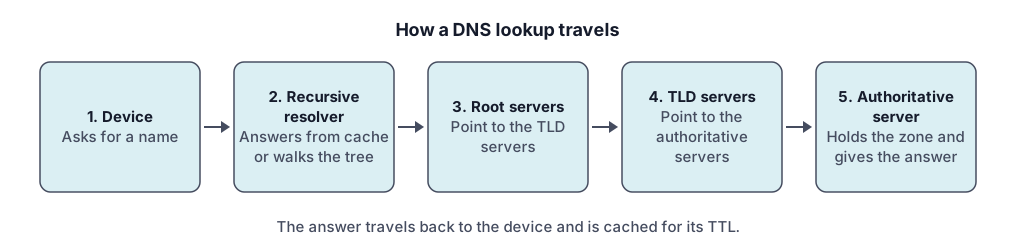
Your device asks a recursive resolver, which RFC 8499 describes as a resolver that acts in recursive mode and is generally expected to cache answers. If it has no cached answer it follows the delegations from the root to the top-level domain to the zone’s authoritative server. The answer is cached for the TTL. Registrations decide which nameservers the TLD points to; see the buying guide for how a name gets registered.
The common record types at a glance (table)
| Type | Holds | Page |
|---|---|---|
| A | One IPv4 address (32 bits) | DNS A record |
| AAAA | One IPv6 address (128 bits) | DNS AAAA record |
| CNAME | The canonical name an alias points to | DNS CNAME record |
| MX | A preference number and a mail exchange name | DNS MX record |
| TXT | One or more text strings | DNS TXT record |
| PTR | A name, used in reverse lookups | reverse DNS and PTR records |
| NS | A nameserver for the zone | covered below |
| SOA | Start of authority for the zone | covered below |
A and AAAA: pointing a name at an address
RFC 1035 defines the A record’s data as a 32-bit Internet address; RFC 3596 adds the AAAA record, type 28, for a 128-bit IPv6 address. Details and examples are on the A record page and the AAAA record page.
CNAME: an alias
A CNAME gives the canonical name for its owner. RFC 1034 says that if a CNAME is present at a node, no other data should be present. See CNAME records.
MX: where mail for the domain is delivered
MX records carry a 16-bit preference, and RFC 1035 says lower values are preferred. See MX records.
TXT: verification and policy text
A TXT record holds one or more character-strings (RFC 1035). It is used for verification and for email policy text such as SPF; see TXT records.
NS and SOA: who is in charge of the zone
NS records name the authoritative servers for a zone, and RFC 2181 requires an NS target to be a name with address records, not an alias. RFC 8499 defines the zone apex as the point in the tree at an owner of an SOA and the corresponding authoritative NS RRset, which is why the apex cannot also hold a CNAME.
TTL and caching
TTL is the maximum time a record may be cached, and RFC 2181 sets its range as 0 to 2147483647. In Cloudflare’s DNS a proxied record uses Auto, which is 300 seconds, while DNS-only records can use a custom value.
How to look your records up
Use the DNS lookup tool to query a name and type. The result shows what the resolver sees, which may differ from what you just saved if the old answer is still cached. Reverse lookups for addresses are explained in the PTR record guide.
Mistakes to avoid (CNAME at the apex, missing trailing dot, wrong TTL)
- CNAME at the apex. The apex holds SOA and NS records, so a CNAME cannot sit there under the RFC 1034 rule. Some providers offer a flattening feature; Cloudflare, for example, documents CNAME flattening.
- Missing trailing dot. RFC 1034 says a complete domain name ends with the root label and prints with a trailing dot; without it a zone file may append the zone name.
- Alias as a target. An NS or MX target must not be an alias.
- Very long TTL before a change. Lower the TTL ahead of planned changes, because caches keep the old value until it expires.
Our sourcing approach is in the editorial policy.
All Dns Records guides
- DNS A Record Explained
A DNS A record maps a name to an IPv4 address. See its fields, example records, how multiple A records behave, TTL, and how to troubleshoot.
- DNS AAAA Record: IPv6 Explained
A DNS AAAA record maps a name to an IPv6 address. See the format, how it differs from an A record, when to add one, and how to test it.
- DNS CNAME Record Explained
A DNS CNAME record makes one name an alias of another. Learn the rules, why it cannot sit at the root, CNAME vs A record, and how to fix conflicts.
- DNS MX Record Explained
A DNS MX record names the mail exchange for a domain and a priority number. Learn how lower values win, why MX cannot be an IP, and null MX.
- DNS TXT Record Explained
A DNS TXT record stores text for a name. Learn the format, string length rules, SPF, DKIM and DMARC syntax pointers, and how to add and check one.
- Reverse DNS Lookup and PTR Records
Reverse DNS maps an IP address back to a name using PTR records under in-addr.arpa and ip6.arpa. Learn how it works, how to look one up, who controls it.
Frequently asked questions
What are DNS records?
DNS records are the entries stored in a domain's zone that answer questions about the name. A website lookup asks for an address record, a mail server asks for MX records, and a verification service may ask for a TXT record. Each record has an owner name, a type, a time to live and a value, held on the zone's authoritative servers.
What is the difference between an A record and a CNAME?
An A record maps a name directly to an IPv4 address. A CNAME maps a name to another name, making it an alias, and the lookup restarts at the target. A CNAME cannot share its name with other records, so it is for subdomains such as www rather than the zone apex, which must hold SOA and NS records.
How many DNS records can a domain have?
The DNS specifications cited here set no fixed count of records per domain, but providers add their own limits. For example, Cloudflare documents a maximum wire size of 4,096 bytes per record and a combined limit of 8,192 characters for records of the same name and type. Check your DNS provider's documentation for its limits.
What does TTL mean?
TTL stands for time to live. It is the maximum time a resolver may cache a record before asking again, and RFC 2181 says it is a number from 0 to 2147483647 seconds. A short TTL lets changes spread faster but means more queries; a long TTL does the opposite. All records in one set must share the same TTL.
Where do I edit DNS records?
You edit them at whichever provider runs your domain's authoritative nameservers, which may be your registrar or a separate DNS service. The nameservers listed in your registration decide this. In Cloudflare's dashboard, for example, you open the DNS Records page, select Add record, choose a type, fill in the fields and save.
How long do DNS changes take?
A change is visible as soon as the authoritative server has it, but resolvers that cached the old answer keep serving it until its TTL runs out. So a record with a one-hour TTL can take up to an hour to disappear from caches. Changing nameservers at the registry is a separate step with its own timing.
Sources and further reading
- RFC 1034: Domain names, concepts and facilities (rfc-editor.org)
- RFC 1035: Domain names, implementation and specification (rfc-editor.org)
- RFC 2181: Clarifications to the DNS specification (rfc-editor.org)
- RFC 3596: DNS extensions to support IP version 6 (rfc-editor.org)
- RFC 8499: DNS terminology (rfc-editor.org)
- Cloudflare: DNS record types (developers.cloudflare.com)
- Cloudflare: Create DNS records (developers.cloudflare.com)
You might also like
- DNS A Record Explained
A DNS A record maps a name to an IPv4 address. See its fields, example records, how multiple A records behave, TTL, and how to troubleshoot.
- DNS AAAA Record: IPv6 Explained
A DNS AAAA record maps a name to an IPv6 address. See the format, how it differs from an A record, when to add one, and how to test it.
- DNS CNAME Record Explained
A DNS CNAME record makes one name an alias of another. Learn the rules, why it cannot sit at the root, CNAME vs A record, and how to fix conflicts.
- DNS MX Record Explained
A DNS MX record names the mail exchange for a domain and a priority number. Learn how lower values win, why MX cannot be an IP, and null MX.
- DNS TXT Record Explained
A DNS TXT record stores text for a name. Learn the format, string length rules, SPF, DKIM and DMARC syntax pointers, and how to add and check one.
- Reverse DNS Lookup and PTR Records
Reverse DNS maps an IP address back to a name using PTR records under in-addr.arpa and ip6.arpa. Learn how it works, how to look one up, who controls it.