How to Register a Domain Name Step by Step
- Written by ZonWhois Editorial Team
- Reviewed by ZonWhois Editorial Team
- Last checked
- Published on
- In Buying Registering Domains
To register a domain name, search for the name at an accredited registrar, create an account, enter accurate registrant details, choose a term and pay, verify the confirmation email, then set nameservers or DNS records. Accurate contact data is a contractual requirement, and unverified details can get the name suspended.

Section of: How to Buy a Domain Name
Registering a domain name takes six steps at any accredited registrar. This page covers the mechanics of the form and what happens afterwards; if you are still deciding where to buy and what to compare, start with the domain buying guide.
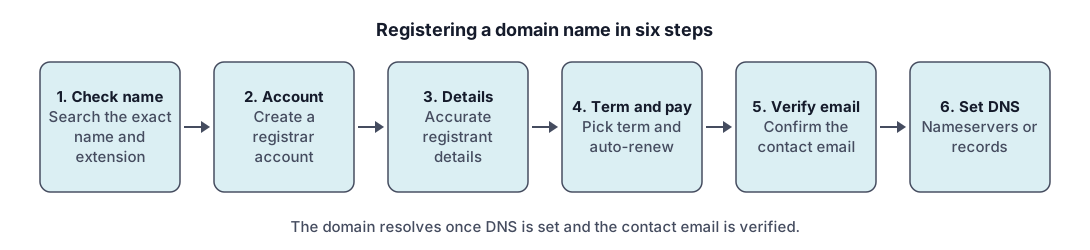
Quick path (6 steps)
- Check that the name is available.
- Create an account with the registrar.
- Enter accurate registrant details.
- Pick the term and auto-renew setting, then pay.
- Verify the contact email.
- Set nameservers or DNS records.
Choose the name and check it
Search the exact name and extension. If the registrar shows it as taken, you can look up the registration record; check domain availability explains what the result means. See the naming checklist before you pay.
Create a registrar account
The registrar account controls the name, so treat it like a bank login: a unique password, two-factor sign-in if offered, and a mailbox only you can read. Anyone who can sign in can change nameservers or move the name away.
Enter registrant details (accuracy requirement)
The registrant is the legal holder of the registration. ICANN’s Registration Data Policy requires registrars to collect the registrant’s name, street, city, state or province, postal code, country, phone and email. The organization field is optional. ICANN’s Registrar Accreditation Agreement (section 3.7.7.1) requires you to give accurate contact details and update them within seven days of a change, and section 3.7.7.2 makes the willful provision of inaccurate or unreliable information, or a failure to respond to accuracy inquiries for over fifteen days, a material breach and a basis for suspension or cancellation.
Public lookups may show less than you entered. The Registration Data Policy requires redaction of personal data in public registration data where the law requires it and allows it for a commercially reasonable purpose; see WHOIS privacy.
Pick term length (1-10 years) and auto-renew
Shorter terms keep the first payment small; longer terms mean fewer renewal dates to miss. For .com, the registry agreement requires the registry to keep offering terms of up to ten years, but other extensions and other registrars can differ. Turn auto-renew on only if the payment method on file will still be valid; see expired domains for what happens after a missed renewal.
Verify the contact email
Under the WHOIS Accuracy Program Specification the registrar must validate and verify your contact data within fifteen days of the registration. If the registrant does not respond, the registrar must verify manually or suspend the registration. Open the email, follow the link, and keep a copy.
Set nameservers and records
Your registrar assigns default nameservers, or you can enter your DNS provider’s. Then add the records you need: see DNS records explained, and test with the DNS lookup tool.
Keep the account safe (2FA, lock)
- Turn on two-factor sign-in.
- Keep the registrant email current.
- Ask your registrar whether it offers a transfer lock and enable it; see how to transfer a domain before you ever move the name. The pages on how long a transfer takes and the worked example of Cloudflare Registrar transfer steps show what to expect.
Record check: claims compared with the cited ICANN, IANA and IETF documents on 2026-11-17; see the editorial policy.
Frequently asked questions
How long does registration take?
The order itself usually completes when payment clears, but the name only works once nameservers or DNS records are set. After registration, ICANN's rules give the registrar fifteen days to verify your contact data. Respond to the verification email quickly. DNS changes after that can take as long as the record's time to live, the maximum caching period.
What details do I need?
You need the registrant's name, postal address, phone number and email address. ICANN's Registration Data Policy lists these as fields registrars must collect. An organization name is optional. Use a mailbox you will keep for years, because verification and renewal notices go there, and do not use an address on the domain itself.
What is the maximum registration period?
It depends on the extension and the registrar. For .com, the registry agreement requires the registry to offer terms of up to ten years. Other extensions have their own registry rules, and a registrar may offer shorter maximums. Choose the term at checkout, and check the registrar's own page if you need more than one year.
Do I have to use my real name?
You must give accurate contact data. ICANN's registrar agreement treats the willful provision of inaccurate or unreliable information as a material breach that can lead to suspension or cancellation of the registration. You can often hide the details from public lookups through redaction or a privacy service, but the registrar still needs real data on file.
Why did I get a verification email?
ICANN's WHOIS Accuracy Program Specification requires registrars to verify contact data within fifteen days of a new registration, transfer or change of registrant. The email asks you to confirm your address. If you do not respond, the registrar must verify manually or suspend the registration, so act on it promptly and check your spam folder.
Sources and further reading
- ICANN: 2013 Registrar Accreditation Agreement and specifications (icann.org)
- ICANN: Registration Data Policy (icann.org)
- ICANN and VeriSign: .com Registry Agreement (effective 1 December 2024) (itp.cdn.icann.org)
- ICANN: Consensus policies for registrars (icann.org)
You might also like
- How to Buy a Domain Name
How to buy a domain name in five steps: pick the name, choose an accredited registrar, compare renewal and transfer terms, check out and verify.
- How Much Does a Domain Name Cost?
What a domain name costs depends on the registry fee, the registrar's margin and renewal terms. See what makes up the price and how to compare fairly.
- Register a .com Domain Name
Register a .com domain name: who runs .com, how registry and registrar differ, the five steps, renewal rules and what to try if the .com is taken.