Transfer a Domain to Cloudflare Registrar
- Written by ZonWhois Editorial Team
- Reviewed by ZonWhois Editorial Team
- Last checked
- Published on
- In Domain transfers
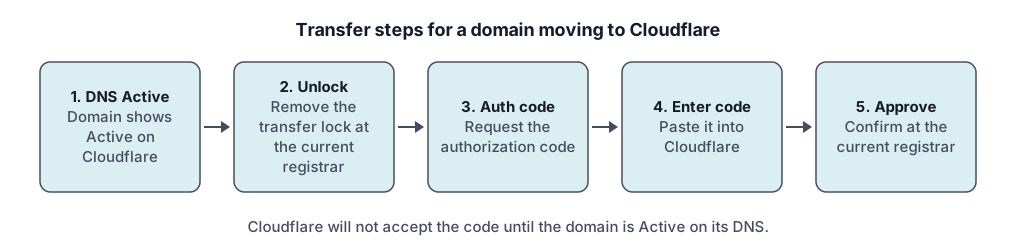
To transfer a domain to Cloudflare Registrar, make the domain Active on Cloudflare DNS, turn off DNSSEC if enabled, unlock the domain and get the authorization code at your current registrar, then enter the code in the Cloudflare dashboard and approve the request. Cloudflare's documentation lists a 60-day minimum age and says total time can reach ten days.
Section of: How to Transfer a Domain Name
Record check: claims compared with the cited Cloudflare and ICANN documents on 2026-11-17.
You can move a domain from GoDaddy or any other registrar to Cloudflare Registrar by following Cloudflare’s own sequence: make the domain Active on Cloudflare DNS, unlock it, enter the authorization code and approve the request. This is the general process in our domain transfer guide applied to one destination. GoDaddy appears only as the starting registrar people search for.
What do you need before you start?
Cloudflare’s prerequisites are specific, so check each one first. Its documentation lists:
- A Cloudflare account with a verified email address and a valid payment method.
- A domain registered at least 60 days ago and not transferred in the last 60 days. Cloudflare calls this an ICANN requirement.
- No change to the registrant name, organization or email in the last 60 days, since such a change triggers a 60-day transfer lock.
- An active account at the current registrar. If the domain expired, renew it there first.
- Only standard characters (letters, numbers, hyphens). Cloudflare says internationalized names are not supported.
- Cloudflare as the authoritative DNS (a full setup) during registration.
Cloudflare supports over 400 extensions and refers you to its list for the details, so confirm yours is supported. Cloudflare’s overview describes its registrar pricing as at cost, with no markup on registry and ICANN charges. We do not quote amounts.
Why move DNS to Cloudflare first?
Cloudflare will not accept the authorization code until the domain is Active on its DNS, so you set that up first. That also keeps your site and email running through the move.
- Add the domain to Cloudflare with the full DNS setup, and copy across every record. See DNS records explained.
- Change the nameservers at your current registrar to the ones Cloudflare assigns.
- Wait for the status to change from Pending to Active. Cloudflare says this usually takes a few minutes but can take up to 24 hours.
- Compare the published records with the DNS lookup tool.
If DNSSEC is enabled at the current registrar, Cloudflare asks you to remove it and wait at least 24 hours before changing nameservers. You can re-enable it in Cloudflare after the transfer.
How do you unlock the domain and get the authorization code?
Unlock the domain at your current registrar and request the authorization code there. The lock may be called a registrar lock, domain lock or transfer lock, and it appears as clientTransferProhibited in public records. Cloudflare warns that some registrars have several lock types, such as a privacy lock, that must each be disabled separately.
The code may be called an auth code, EPP code, authinfo code or transfer code. Request it only when you are ready to enter it, because Cloudflare notes that codes expire.
How do you start the transfer in Cloudflare?
Open Transfer domains in the Cloudflare dashboard, then do the following.
- Select the domain and enter the authorization code.
- Check that your payment method is valid.
- Enter your registrant contact details and select Confirm transfer. Cloudflare redacts this from public WHOIS by default, but says ICANN requires accurate details. For
.ca,.mxand.nzyou may get a separate verification email. Learn more in what WHOIS privacy is.
How long does it take?
Cloudflare says your active work is about 30 minutes and the total is up to 10 days, depending on your current registrar. It adds that most registrars release a domain within five business days and some extensions take up to ten. Your current registrar will usually email you for approval, and approving it there speeds things up. The policy details are in how long a domain transfer takes.
What should you check after the transfer?
Check the records, DNSSEC and the renewal date once the transfer completes.
- Compare DNS records with your saved copy.
- Re-enable DNSSEC in Cloudflare if you had it on.
- Check the new expiry date. Cloudflare says most gTLD transfers add one year from the current expiration date, but country-code extensions follow their own rules (for example,
.ukadds no year). - Recently expired domains: Cloudflare says to wait at least 45 days after the original expiration date, or the registry may not add the extra year.
- Verify the registrant email if prompted. Cloudflare says an unverified email can lead ICANN to place a hold that swaps in parking nameservers.
What if the transfer fails?
Start with Cloudflare’s troubleshooting page, which lists the usual causes: a lock still on, DNSSEC still active, an invalid code, a 60-day block, a restricted status such as clientHold or redemptionPeriod, a failed payment or a rejection by the previous registrar. To restart, Cloudflare says to choose Cancel Transfer and Retry in Manage domains (not for .uk). Shopify and Block domains usually block nameserver changes, and Cloudflare documents a multi-step workaround.
Frequently asked questions
Is Cloudflare a registrar?
Yes. Cloudflare Registrar is Cloudflare's domain registration service, and its documentation says you can buy and manage domains through it. It also offers DNSSEC and redacts WHOIS contact details by default. It is one of many registrars. This page explains how to move a domain in and does not rank or recommend registrars.
Which extensions can be transferred to Cloudflare?
Cloudflare's documentation says it supports over 400 extensions and points to a separate page for the full list of supported and coming-soon ones. It says internationalized names with xn-- Punycode are not supported, and .us has extra requirements. If your extension does not appear on its list, a transfer is not possible, so check before you start.
Will transferring change my DNS?
The transfer itself does not, but Cloudflare requires its DNS to be authoritative for the domain, so you first add the domain and change the nameservers at the current registrar. Copy your existing records into Cloudflare before switching, then compare them afterward with a DNS lookup. Cloudflare's guide has you do this before entering the code.
What does the transfer cost?
Cloudflare describes its registrar pricing as at cost, meaning you pay what the registry and ICANN charge, and the transfer includes the extra year of registration. We do not quote an amount because prices change and vary by extension. Check the price shown in your Cloudflare dashboard before you confirm, and confirm with your current registrar if it charges any release fee.
Can I transfer a domain back out of Cloudflare?
Yes. Cloudflare's documentation says to unlock the domain in the dashboard, copy the authorization code, enter it at the new registrar and confirm the approval. The same ICANN rules apply: it cannot move if registered or transferred in the last 60 days, or if the registrant details changed in that time. Cloudflare also warns that admins can unlock domains.
Sources and further reading
- Cloudflare Registrar: transfer your domain to Cloudflare (developers.cloudflare.com)
- Cloudflare Registrar: troubleshoot failed domain transfers (developers.cloudflare.com)
- Cloudflare Registrar: supported top-level domains (developers.cloudflare.com)
- Cloudflare Registrar: transfer out from Cloudflare (developers.cloudflare.com)
- Cloudflare Registrar overview (developers.cloudflare.com)
- ICANN Transfer Policy (updated 21 February 2024) (icann.org)
- ICANN EPP status codes: what they mean (icann.org)
You might also like
- How to Transfer a Domain Name
How a registrar-to-registrar domain transfer works: the 60-day rules, unlocking, the authorization code, approval and what to check afterward.
- How Long Does a Domain Transfer Take?
A domain transfer can finish in minutes once approved and takes up to about five days by default. See the ICANN time limits and what causes delays.