Domain Owner Lookup: Who Owns a Domain
- Written by ZonWhois Editorial Team
- Reviewed by ZonWhois Editorial Team
- Last checked
- Published on
- In Whois And Rdap Lookup
To find who owns a domain, run an RDAP or WHOIS lookup and read the registrant, registrar and abuse contact. Often you will not see a name, because ICANN policy requires many registrant fields to be redacted. In that case the record gives a relay email address or web form, and the registrar's abuse contact is the right route for misuse.

Section of: WHOIS Domain Lookup Explained
A domain owner lookup starts with the WHOIS and RDAP lookup tool, but the honest answer is that you often cannot see the owner. The WHOIS guide explains why. This page shows how to get as far as the record allows, and what to do next.
The short answer: often you cannot see the owner
A public lookup shows the registrant only if the registrar publishes it, and many records now redact it. ICANN’s Registration Data Policy lists the registrant name, street, postal code and phone among fields that must be redacted where required, and redacted output has to say so. What remains public is still useful: the registrar, creation date, status and an abuse contact.
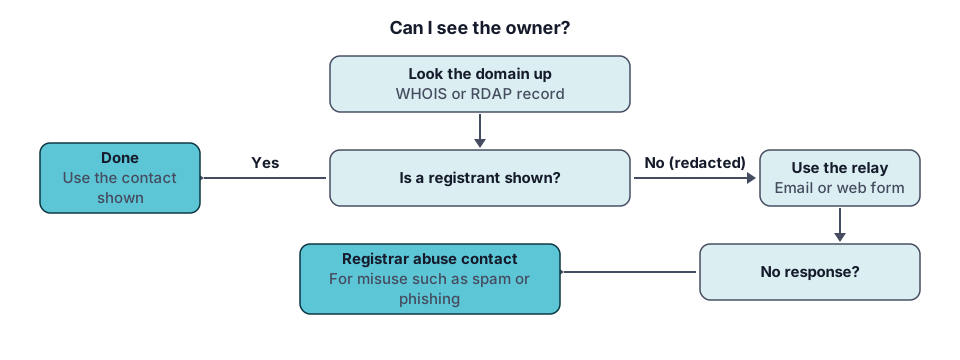
Step 1: run an RDAP or WHOIS lookup
Enter the domain, such as example.com, without “https://” or a path. Use the lookup tool or the ICANN lookup described in the ICANN WHOIS guide. If a result looks empty, try the bare registrable name rather than a subdomain such as www. Prefer a terminal? The whois command runs the same lookup from the command line.
Step 2: read registrar, dates, status and abuse contact
Four fields tell you most of what you need.
- Registrar: the company that manages the registration, and the party that can act on it.
- Creation and expiry dates: whether the domain is new, long established or about to lapse. See how to check when a domain expires.
- Status: locks such as clientTransferProhibited are normal; hold statuses mean the name is not resolving. The WHOIS guide lists the common ones.
- Abuse contact: the registrar’s email and phone for reports. The policy requires them to be published.
Step 3: when the owner is hidden
Look for a field labelled as an email relay or a link to a contact form. A registrar that redacts contact emails must publish an email address or a link to a web form that lets you reach the registrant without revealing their identity, and it must keep logs showing a message was relayed, though not its contents. Your message is forwarded; whether you hear back is up to the owner. Privacy and proxy services add another layer, covered in WHOIS privacy.
Contacting a hidden owner
- Use the relay address or web form from the record.
- Check the website itself for a contact page, footer email or social profile.
- If you want to buy the domain, say which name you mean and give a way to reply. Keep it short.
- Do not pay anyone who contacts you first claiming to represent the owner without confirming it through the relay.
Reporting abuse or a legal problem
For phishing, malware or other misuse, send the report to the registrar’s abuse contact shown in the record, with the URL, date and evidence. For a legal claim, a registrar or registry operator must publish how to submit a disclosure request for nonpublic data. Under the policy they acknowledge within two business days and respond within 30 calendar days of acknowledgement, absent exceptional circumstances, and the response must either provide the data or explain the reasons for denial. ICANN’s Registration Data Request Service offers a standard format for submitting requests for nonpublic gTLD data. Seek qualified legal advice before relying on any of this in a dispute.
What you cannot do
A lookup cannot identify a person behind a redacted record, confirm that a named registrant legally owns a brand or business, or tell you who is behind a website’s content. It also cannot search by owner name: reverse searches are a different kind of data that this site does not offer. For country-code domains, the registry’s own rules apply and the displayed fields differ.
Next, read what WHOIS privacy hides and, if you need a number rather than a name, IP address WHOIS and RDAP.
Record check: claims compared with the cited ICANN, IANA and IETF documents on 2026-11-17.
Frequently asked questions
Can I find out who owns a website?
Sometimes. A lookup shows the registrant only when the registrar publishes it, and many records now show a redaction notice instead. You can still see the registrar, creation date, status, nameservers and an abuse contact, plus a relay email or web form where one is offered. A website's own contact or about page is often the faster route to a real person.
Why is the registrant name hidden?
ICANN's Registration Data Policy requires registrars and registry operators to redact registrant name, street, postal code and phone where required to comply with applicable law, and they may also redact for commercially reasonable purposes. The output must say the value is redacted. A private registration service can hide the details further. Hidden does not mean illegitimate.
Is it legal to look up domain ownership?
Looking up the registration data that registrars and registries publish is a normal activity. What you do with it is a separate matter. Using contact details for unsolicited marketing, harassment or anything else prohibited can break the law or the registry's terms. This is general information, not legal advice; ask a lawyer about a specific situation.
How do I contact the owner of a domain?
Use the relay email address or web form shown in the record, since registrars that redact emails must provide one. If there is none, try the contact page on the website itself. Messages sent through a relay are forwarded without revealing the owner's identity, and there is no guarantee of a reply. A sale enquiry is best kept short and specific.
Is there a free reverse WHOIS?
Reverse WHOIS searches by owner name or email instead of by domain. Because registrant fields are now mostly redacted, it is likely to be far less useful than it once was. A normal lookup works from a domain to its record. ZonWhois does not offer a reverse search.
Sources and further reading
- ICANN: Registration Data Policy (icann.org)
- ICANN: Registration Data Request Service (RDRS) (icann.org)
- ICANN: Data protection and privacy (icann.org)
- RFC 9083: JSON Responses for RDAP (rfc-editor.org)
You might also like
- WHOIS Domain Lookup Explained
What WHOIS and RDAP are, what a domain record shows, why owner details are often redacted, and how to read registrar, dates and status codes.
- ICANN WHOIS Lookup: WHOIS vs RDAP
How the ICANN lookup relates to WHOIS and RDAP, why RDAP replaced port-43 WHOIS for gTLDs, and how lookup tools differ in what they show.
- IP Address WHOIS: ARIN, RIPE and RDAP
How an IP address WHOIS or RDAP lookup works, what the five regional internet registries publish, and what the result can and cannot tell you.
- The whois Command: Linux, macOS, Windows
How to run the whois command on Linux, macOS and Windows, read its output, and use RDAP from the command line when WHOIS shows too little.
- WHOIS Privacy: What It Is and Whether You Need It
What WHOIS privacy hides, how redaction after GDPR differs from a paid privacy service, what stays public, and what to check at your registrar.