DNS TXT Record Explained
- Written by ZonWhois Editorial Team
- Published on
- In Dns Records
A DNS TXT record stores one or more text strings for a name. Services use it to verify domain ownership, and email standards use it to publish SPF, DKIM and DMARC policies. Each string is limited to 255 octets, and longer values are split into several strings that readers join together without spaces.

Section of: DNS Records Explained: Types and Examples
A TXT record holds text, and it is the catch-all type in DNS records explained. RFC 1035 defines its data as one or more character-strings.
What a TXT record is
A TXT record is attached to a name and carries one or more strings. Nothing in DNS interprets the text; the service reading it does. That is why the same type serves verification, email policy and other purposes.
Example
example.com.  3600  IN  TXT  "v=spf1 mx -all"
_dmarc.example.com.  3600  IN  TXT  "v=DMARC1; p=none"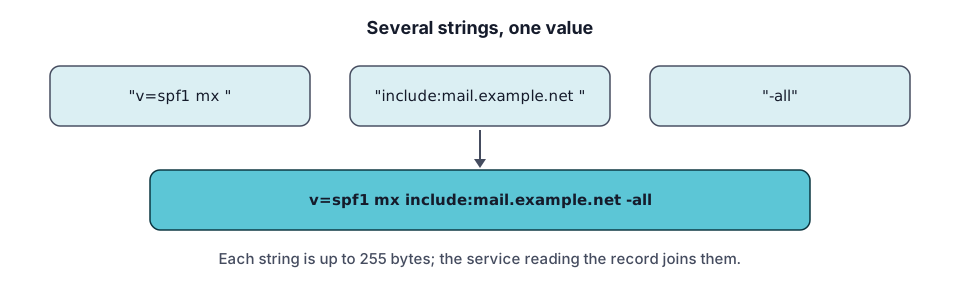
Common uses: ownership verification, SPF, DKIM, DMARC (syntax pointers only)
- Ownership verification. A service gives you a value to publish; it checks for it.
- SPF. RFC 7208 says an SPF record is a TXT record beginning v=spf1, a domain must not have multiple records that would cause the check to select more than one, and evaluation is limited to 10 lookup terms. Records that do not begin with exactly v=spf1 are discarded.
- DKIM. RFC 6376 says DKIM keys are stored in a subdomain named _domainkey, under a selector. An empty p= value means the key is revoked, so a working record needs key data after p=.
- DMARC. RFC 7489 says the policy is published as a TXT record at _dmarc. The v tag must come first with the value DMARC1, and the p tag is required, with values none, quarantine or reject.
This page covers syntax only. It does not recommend mail providers or services.
String length and splitting
A character-string is limited to 255 octets, and RFC 7208 section 3.3 says several strings in one record must be treated as concatenated without adding spaces. That is how long keys are published:
example.com. 3600 IN TXT "first part of a long value" "second part"reads as the two strings joined with no space between them.
Add a TXT record
- At your DNS provider, choose Add record and select TXT.
- Enter the name. For a root record use the zone name or the provider’s symbol for it.
- Paste the value exactly as given. Cloudflare adds the double quotes for you if you leave them out.
- Save and check it with the DNS lookup tool.
Check a TXT record (tool)
Select TXT in the DNS lookup tool and enter the exact name, including underscore labels such as _dmarc.
Troubleshooting
- Quotes inconsistent. Cloudflare says inconsistent quotation marks cause validation errors.
- Two SPF records. Merge them into one; RFC 7208 treats multiple matching records as an error.
- Value cut off. Split long values into several strings of 255 octets or fewer.
- Wrong name. DKIM and DMARC live at special subdomains, not at the root.
Related pages: MX records for where mail goes, and CNAME records for the rule that a CNAME cannot share a name with a TXT record.
Frequently asked questions
What is a TXT record used for?
A TXT record publishes free-form text for a name. The two common uses are proving you control a domain, when a service gives you a string to publish, and email authentication, where SPF, DKIM and DMARC policies are published as text. The DNS itself does not interpret the text; the reader does.
How long can a TXT record be?
Each character-string is limited to 255 octets, but a record can hold several strings that readers join together without spaces, per RFC 7208. Providers add limits of their own. Cloudflare documents a 4,096-byte wire format limit per record and an 8,192-character combined limit for records of the same name and type.
How do I verify a domain with TXT?
The service you are verifying with gives you a name and a text value. Add a TXT record with exactly those values at your DNS provider, wait for the old cache to clear, then ask the service to check. Verification text is public, so it should never contain a secret. Remove it afterwards only if the service says it is no longer needed.
Why does my TXT show quotes?
The quotes are the delimiters of a character-string, and a record can contain several quoted strings. Cloudflare's reference describes TXT content as one or more text strings delimited by double quotes and adds quotes automatically if you save without them. If tools show quotes, the value is usually fine; inconsistent quotes cause validation errors.
Can I have more than one TXT record on a name?
Yes. A name can carry several TXT records, for example one for domain verification and one for another purpose. The exception is SPF: RFC 7208 says a domain must not have multiple records that would cause the check to select more than one. Keep a single SPF record per name and merge any extra terms into it.
Sources and further reading
- RFC 1035: Domain names, implementation and specification (rfc-editor.org)
- RFC 7208: Sender Policy Framework (SPF) (rfc-editor.org)
- RFC 6376: DomainKeys Identified Mail (DKIM) signatures (rfc-editor.org)
- RFC 7489: DMARC (rfc-editor.org)
- Cloudflare: DNS record types (developers.cloudflare.com)
You might also like
- DNS Records Explained: Types and Examples
What DNS records are, how a lookup finds them, and what A, AAAA, CNAME, MX, TXT, NS and SOA records do, with examples and common mistakes.
- DNS A Record Explained
A DNS A record maps a name to an IPv4 address. See its fields, example records, how multiple A records behave, TTL, and how to troubleshoot.
- DNS AAAA Record: IPv6 Explained
A DNS AAAA record maps a name to an IPv6 address. See the format, how it differs from an A record, when to add one, and how to test it.
- DNS CNAME Record Explained
A DNS CNAME record makes one name an alias of another. Learn the rules, why it cannot sit at the root, CNAME vs A record, and how to fix conflicts.
- DNS MX Record Explained
A DNS MX record names the mail exchange for a domain and a priority number. Learn how lower values win, why MX cannot be an IP, and null MX.
- Reverse DNS Lookup and PTR Records
Reverse DNS maps an IP address back to a name using PTR records under in-addr.arpa and ip6.arpa. Learn how it works, how to look one up, who controls it.