How to Transfer a Domain Name
- Written by ZonWhois Editorial Team
- Reviewed by ZonWhois Editorial Team
- Last checked
- Published on
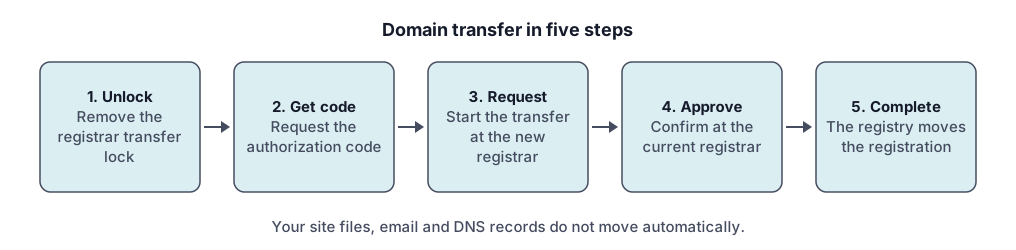
To transfer a domain, unlock it at your current registrar, request its authorization code, start the transfer at the new registrar with that code, and approve the request. ICANN's Transfer Policy blocks transfers within 60 days of registration or of an earlier transfer, and a completed transfer adds one year to the registration.

Reviewed by the editorial desk against the cited ICANN sources on 2026-11-17.
A domain transfer moves your domain’s registration from one registrar to another. Unlock the domain, get its authorization code, give the code to the new registrar and approve the request. It follows ICANN’s Transfer Policy, so the same rules apply to most generic domains. Timing is covered in how long a domain transfer takes.
What is a registrar transfer?
A registrar transfer changes which company manages the registration of your domain name. It does not move your website files, your email or your DNS records, and it does not change who legally holds the name.
Three things are easy to confuse:
- Registrar is the accredited company where you registered and renew the name.
- DNS hosting is where the records that point the name at servers are published. That can be the registrar or another provider. See DNS records explained.
- Registrant is the person or organization that holds the name. Changing the registrant is a different process from changing the registrar, and it can start its own lock (see below).
What to check before you start
Check four things before you start, because each one is a common reason transfers fail.
- The 60-day rules. The ICANN Transfer Policy lets the current registrar deny a request made “within 60 days of the creation date as shown in the registry RDDS record” (section I.A.3.7.5). It also covers a domain that was itself transferred within the last 60 days (section I.A.3.7.6).
- A recent registrant change. The policy says the registrar “must impose a 60-day inter-registrar transfer lock following a Change of Registrant” (section II.C.2), and lets the registrar offer the holder an opt-out beforehand.
- The domain’s status. A registrar-set
clientTransferProhibitedstatus tells the registry to reject transfers. ICANN’s status-code page says you must ask your registrar to remove it. - An active registration. Cloudflare’s documentation says that if the domain has expired you should renew it at the current registrar first.
You can read the creation date and statuses of any name with the WHOIS and RDAP lookup tool. Check that your contact email at the current registrar still works, because approval and codes are often sent there.
Step 1: unlock the domain and get the authorization code
Ask your current registrar to remove the transfer lock, then request the authorization code. In your registrar’s account, the lock may be called a registrar lock, domain lock or transfer lock. It appears in public records as clientTransferProhibited.
The policy requires registrars to give the holder the code (section I.A.5.2). It also says a registrar must not refuse to release the code solely because of a dispute over payment (section I.A.5.4). If your registrar has no self-service lock control, it must remove the lock within five calendar days of your request (section I.A.5.2).
Request the code only when you are ready to use it. Cloudflare’s guide notes that codes expire, so ask your registrar how long yours is valid. Some registrars also run a separate privacy or protection lock that must be switched off on its own.
Step 2: start the transfer at the new registrar
Start the transfer in the new registrar’s account, entering the domain name and the code. The new registrar sends the request to the registry, which notifies the current registrar. The transfer adds a year to your term (see below). Check the new registrar’s fee page for any transfer charge: we do not quote prices.
Before you start, make sure the new registrar can serve the domain’s extension. Some country-code extensions use different mechanisms. Cloudflare’s documentation, for example, notes that .uk domains have no authorization code and that the current registrar changes a tag instead.
Step 3: approve the request and wait
The current registrar may email you to approve the transfer; approving it ends the waiting period early. Under the Transfer Policy, a registrar that does not respond “within five (5) calendar days” is treated as approving (section I.A.3.5), and the registry completes the transfer unless it receives a rejection within five calendar days (section I.A.6.2).
Cloudflare’s documentation gives a practical range: most registrars release a domain within five business days, and up to ten business days for some extensions. The full breakdown is in how long a domain transfer takes.
How do you keep your website and email working?
A transfer should not change your DNS, but a careless nameserver change can break things. A registrar transfer moves the registration, so your records keep working if the nameservers stay the same.
- Export or copy every DNS record before you start, including A, MX and TXT records. Our guide to DNS records explains each type.
- Do not change nameservers in the same hour as you start the transfer unless the new registrar’s own guide tells you to.
- If DNSSEC is on, follow the new registrar’s instructions: Cloudflare’s guide, for instance, asks you to remove DNSSEC at the current registrar and wait at least 24 hours before changing nameservers.
- Use the DNS lookup tool before and after to compare what is published.
What can go wrong?
The usual causes are a lock still on, a wrong or expired code, a recent registration or registrant change, a restricted status, or a registration that has expired.
- Still locked. Remove every lock type, including any privacy lock.
- Wrong or expired code. Request a fresh one. Cloudflare’s troubleshooting page also advises removing trailing spaces when you paste it.
- Within 60 days. Check the creation and last-transfer dates in the record.
- A restricted status. Cloudflare lists
clientHold,serverHold,redemptionPeriodandpendingDeleteas blocking transfers. ICANN explains each status on its status-code page. - Expired domain. The policy does not give a special expired-domain transfer rule, but unpaid registration periods are a recognised ground for denial. Renew first, then transfer. Learn more about what happens when a domain expires.
- WHOIS privacy in the way. Ask the current registrar if its privacy service is blocking the request. See WHOIS privacy.
- Dispute or court order. The policy requires denial while a UDRP proceeding or court order is pending (section I.A.3.8).
What does the transfer do to your renewal date?
A completed transfer adds one year. Section I.A.8 of the policy says a completed holder-authorized transfer “shall result in a one-year extension of the existing registration” and “in no event shall the total unexpired term of a registration exceed ten (10) years.” If your term is already near ten years, a transfer can fail for that reason. Check your current date with how to check when a domain expires.
After the transfer
Once the transfer shows complete, verify before you relax.
- Look up the domain and confirm the new registrar.
- Compare the DNS records with your saved copy.
- Turn the transfer lock back on. ICANN notes that
clientTransferProhibitedhelps block unauthorized transfers. - Confirm auto-renew and a working contact email at the new registrar.
- Re-enable DNSSEC if you disabled it.
Where to go next
For the time estimate read how long a domain transfer takes. For a worked example with one destination see transferring a domain to Cloudflare Registrar. Our editorial policy explains how we check these pages.
All Domain Transfers guides
- How Long Does a Domain Transfer Take?
A domain transfer can finish in minutes once approved and takes up to about five days by default. See the ICANN time limits and what causes delays.
- Transfer a Domain to Cloudflare Registrar
Steps to transfer a domain to Cloudflare Registrar from GoDaddy or any other registrar: prerequisites, DNSSEC, unlock, auth code, timing.
Frequently asked questions
How long does a domain transfer take?
Under ICANN's Transfer Policy the registry completes the transfer unless the current registrar rejects it within five calendar days, so approving the request promptly can finish it much sooner. Cloudflare's documentation says most registrars release a domain within five business days and some country-code domains take up to ten. Our separate guide covers the stages in detail.
Will my website go down during a transfer?
A registrar transfer moves the registration, not the website or the DNS records, so it should not interrupt the site if the nameservers and records stay the same. Problems usually come from changing nameservers or DNSSEC settings at the wrong moment. Copy your DNS records first, keep the same nameservers until the transfer completes, and then check every record afterward.
Do I lose my renewal time when I transfer?
No. ICANN's Transfer Policy says a completed holder-authorized transfer results in a one-year extension of the existing registration, and the total unexpired term can never exceed ten years. Some country-code domains follow their own registry rules and may not add a year, so check the rules for your extension before you start.
Why was my domain transfer rejected?
The Transfer Policy lists the only grounds on which the current registrar may deny a request: evidence of fraud, a dispute over who the holder is, non-payment, an express objection from the holder, and the two 60-day rules. It must deny a transfer in some cases, such as a pending UDRP proceeding or a court order. A lock you forgot to remove, a wrong code or a restricted status are the usual practical causes.
What is an authorization (EPP) code?
An authorization code, called an AuthInfo code in ICANN's policy and often an EPP or transfer code, is a secret your registrar gives you to prove you control the domain. The policy requires registrar-generated codes to be unique per domain and to be used to identify the registered name holder. Treat it like a password and request it only when you are ready to use it.
Can I transfer a domain within 60 days of registering it?
Generally no. ICANN's Transfer Policy allows the current registrar to deny a transfer requested within 60 days of the creation date in the registry record, and within 60 days after a previous transfer. Waiting out the period is the only fix. Registries and registrars can differ on details, so confirm with your registrar before you pay.
Sources and further reading
- ICANN Transfer Policy (updated 21 February 2024) (icann.org)
- ICANN Domain Name Transfer Policies and version history (icann.org)
- ICANN EPP status codes: what they mean (icann.org)
- ICANN consensus policies (icann.org)
- Cloudflare Registrar: transfer a domain to Cloudflare (developers.cloudflare.com)
You might also like
- How Long Does a Domain Transfer Take?
A domain transfer can finish in minutes once approved and takes up to about five days by default. See the ICANN time limits and what causes delays.
- Transfer a Domain to Cloudflare Registrar
Steps to transfer a domain to Cloudflare Registrar from GoDaddy or any other registrar: prerequisites, DNSSEC, unlock, auth code, timing.