How to Check When a Domain Expires
- Written by ZonWhois Editorial Team
- Reviewed by ZonWhois Editorial Team
- Last checked
- Published on
- In Expired domains
To check when a domain expires, look up the domain in a WHOIS or RDAP lookup and read the expiration date, which RDAP records as an event of action expiration. If it is your domain, the registrar account shows the renewal date too. Public records can omit the date, so the registrar is the reliable source.

Section of: Expired Domains: How They Work
You can check when a domain expires by looking it up in a WHOIS or RDAP record, where the date appears as an expiration event. For a domain you own, your registrar account is the more reliable source. This page belongs to the expired domains guide and covers finding the date only.
What is the short answer?
Look the domain up and find the expiration date. RFC 9083 defines the RDAP event action “expiration” as meaning the object “has been removed or will be removed at a predetermined date and time from the registry.” RDAP is the protocol that replaces WHOIS, so the same date may appear under a label such as “Registry Expiry Date” in a WHOIS-style display.
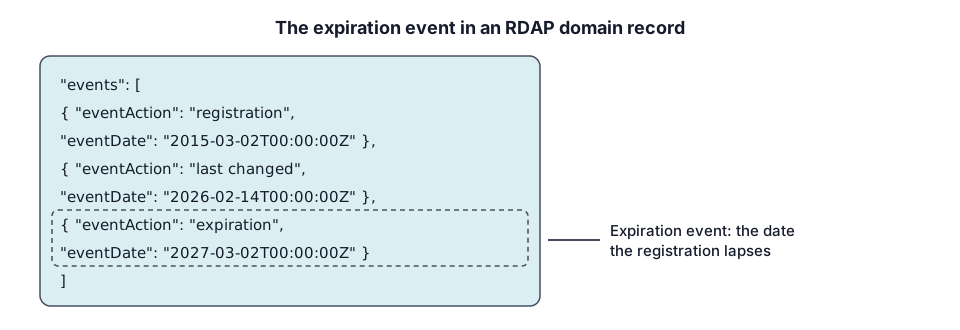
How do you check with the lookup tool?
Enter the domain in our WHOIS and RDAP lookup tool and read the events or dates section. It queries the same public data as other RDAP clients. RDAP.org is the bootstrap service that redirects a query to the authoritative server, using the format https://rdap.org/domain/example.com, and it notes that it has rate limits. ICANN also runs its own Lookup tool. For what the rest of a record means, see the WHOIS guide.
How do you find it in your registrar account?
Sign in to your registrar and open the domain list. The renewal or expiry date is normally shown next to each name along with the auto-renew setting. This is the date your registrar will act on, so it is the one to rely on if it differs from a public record.
Why can the date be wrong or missing?
A public record may omit the date or be redacted, and a registrar and a registry can show slightly different dates around a renewal or transfer. RDAP defines the event, but whether a record includes it is up to the registry. If a lookup is empty, the domain may be unregistered, or may use an extension with different publication rules. Use your registrar account for your own names. If you are checking someone else’s name, read how expired domains work to see what the date means.
How do you set reminders and keep auto-renew on?
Turn on auto-renew, keep the payment method valid and add the date to your calendar a month ahead. ICANN’s Expired Registration Recovery Policy requires registrars to send expiration notices about one month and one week before, so keep the contact email current. For what happens if the date passes, read domain expiration, grace and redemption periods.
Beware fake renewal notices
Renew only inside your registrar account, never from a link in an unexpected message. The ICANN policy requires registrars to describe on their websites how they deliver expiration notices, so compare any notice with that description. If you want to buy a name after it expires, see buying a released name.
Frequently asked questions
Can anyone see my domain's expiration date?
Usually yes. RDAP and WHOIS records are public and normally include an expiration event, which is why lookup tools can show it for any registered name. Some records are redacted or incomplete, and which fields appear depends on the registry and registrar.
Why does WHOIS show no expiry date?
Not every record includes one. RDAP defines an expiration event, but a registry or registrar may leave it out, and country-code extensions follow their own rules for what they publish. If a lookup shows no date, check your registrar account, which holds the date it will bill you for.
Is the expiry date the same as the registry date?
Not always. A registrar's account may show its own renewal date, while the public record shows the registry's expiration event, and the two can differ in the days around a renewal or transfer. When they disagree, treat the earlier date as the deadline and ask your registrar which date applies to your domain.
How early should I renew?
Well before the date. Registrars must send notices about a month and about a week beforehand, so renewing when the first one arrives leaves a margin. Turn on auto-renew and keep a valid payment method. If you miss the date, ICANN's policy still lets owners renew for a limited time, but your site and email may stop working first.
What is the difference between RDAP and WHOIS for finding the date?
RDAP is the newer protocol that replaces WHOIS, and it returns structured data in which the expiration appears as a labelled event with a date. WHOIS output is free text, so the label varies by registry. Our lookup tool queries RDAP through the bootstrap service, which redirects each query to the authoritative server for the domain's extension.
Sources and further reading
- IETF RFC 9083: JSON Responses for the Registration Data Access Protocol (RDAP) (rfc-editor.org)
- RDAP.org: bootstrap service (about.rdap.org)
- ICANN Lookup (lookup.icann.org)
- ICANN Expired Registration Recovery Policy (icann.org)
- ICANN EPP status codes: what they mean (icann.org)
You might also like
- Expired Domains: How They Work
What happens when a domain name expires: renewal notices, the grace and 30-day redemption periods, release, and the risks of buying one.
- Check Domain Name Availability
How to check if a domain name is available: use a registrar search for the final answer, a lookup as a hint, and check variations and trademarks.
- Domain Expired: Grace and Redemption Periods
What happens after a domain expires: renewal notices, DNS interruption, the 30-day redemption period and pending delete, and how to recover it.
- How to Buy an Expired Domain
How to buy an expired domain: why expired does not mean available, the routes to a name, checks before you pay, risks and Google's spam policy.