DNS CNAME Record Explained
- Written by ZonWhois Editorial Team
- Published on
- In Dns Records
A DNS CNAME record makes one name an alias of another, called the canonical name. A resolver that finds a CNAME restarts the lookup at the target name. A name with a CNAME should have no other records, so a CNAME cannot sit at the zone apex, where SOA and NS records already exist.

Section of: DNS Records Explained: Types and Examples
A CNAME record turns one name into an alias for another. It is one of the types in DNS records explained, and it is the record people most often misplace.
What a CNAME record does
RFC 1034 says a CNAME record identifies its owner name as an alias and gives the canonical name in its data. When a resolver finds a CNAME, it restarts the lookup at the target name and returns both. RFC 8499 notes that the owner of a CNAME is the alias, not a canonical name.
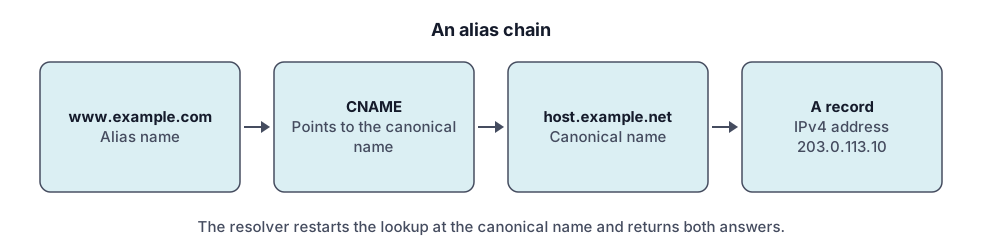
Example
www.example.com.   3600  IN  CNAME  site.example.net.
site.example.net.  300   IN  A      203.0.113.10
A lookup for www.example.com returns the CNAME, then the address of the target.
Rules (no CNAME at the zone apex, no other records beside it)
- No other data. RFC 1034: if a CNAME is present at a node, no other data should be present. RFC 2181 allows only DNSSEC-related records beside it.
- One target. RFC 2181: there may be only one canonical name for any one alias.
- Not at the apex. The apex is the owner of the zone’s SOA and NS records (RFC 8499), so a plain CNAME cannot be placed there.
- Not as an NS or MX target. RFC 2181 says those targets must not be aliases.
CNAME vs A record
Use an A record when you have an IPv4 address (or AAAA for IPv6). Use a CNAME when a subdomain should follow another name. If the target’s address changes, the alias follows automatically.
Common uses (www, verification, subdomains)
- Pointing www at another name.
- Pointing a subdomain at a service that gives you a target hostname.
- Verification records that ask for a CNAME. Verification by text is covered in TXT records.
Check a CNAME (tool)
Select CNAME in the DNS lookup tool to see the target. If the answer shows an address instead, no CNAME exists on that name.
Troubleshooting
- Conflict error when saving. The name already has another record; remove it or use another name.
- Chain does not resolve. For a proxied name, Cloudflare says the final record must point to a hostname with a valid IP address.
- Proxied CNAME to another content network. Cloudflare warns a proxied version can cause connectivity errors.
- Other record types on the same name. For a proxied name, Cloudflare does not support queries for other record types on the same name as a CNAME.
See also the MX record page for the alias rule on mail targets.
A short checklist before you add or change a CNAME
- Look at what already exists on the name with the DNS lookup tool. If an address or text record is already there, a CNAME will conflict with it.
- Check that the target is a host name, written in full, and that the service you are pointing at has told you that exact name.
- Decide whether you are on the bare domain or a subdomain. Alias records belong on subdomains such as www.
- Save, wait for caches to age out, then look the name up again and confirm it returns the target.
Common mistakes: adding a CNAME to a name that already carries other records, copying a target with a stray space or missing dot, and pointing a name at an alias of an alias without checking where the chain ends.
Questions to ask the service you are pointing at: which host name should I use as the target, does it need a separate verification record, and what should I expect to see once it works?
Frequently asked questions
Can I use a CNAME on the root domain?
Not under the base rules. The root of a zone, called the apex, holds SOA and NS records, and RFC 1034 says no other data should sit beside a CNAME. Some DNS providers offer flattening features that behave like an alias at the apex. Cloudflare, for example, documents CNAME flattening. Check your provider's documentation.
What is the difference between A and CNAME?
An A record maps a name to an IPv4 address. A CNAME maps a name to another name and the lookup continues there. Use A (or AAAA) when you have an address, and CNAME when you want a subdomain to follow another name, so it keeps working if the target's address changes.
Why do I get a conflict error?
Your DNS provider is enforcing the rule that a CNAME cannot share a name with other records. If the name already has an A, MX or TXT record, adding a CNAME is refused, and the reverse. Remove the other records from that exact name, or move the alias to a different subdomain.
Does a CNAME slow lookups?
It adds a step. The resolver receives the CNAME, then restarts the lookup at the canonical name, per RFC 1034, so there is at least one more query when nothing is cached. Cached answers make this small in practice, but long chains add up. For a proxied name, Cloudflare notes that the final record must point to a hostname with a valid IP address.
Can a CNAME point to another CNAME?
The specifications allow an alias to point at a name that is itself an alias, and the resolver follows each step. Long chains add queries and make faults harder to trace. For a proxied name, Cloudflare says the final record must point to a hostname with a valid IP address. Keep chains short, ideally a single step.
Sources and further reading
- RFC 1034: Domain names, concepts and facilities (rfc-editor.org)
- RFC 2181: Clarifications to the DNS specification (rfc-editor.org)
- RFC 8499: DNS terminology (rfc-editor.org)
- Cloudflare: DNS record types (developers.cloudflare.com)
You might also like
- DNS Records Explained: Types and Examples
What DNS records are, how a lookup finds them, and what A, AAAA, CNAME, MX, TXT, NS and SOA records do, with examples and common mistakes.
- DNS A Record Explained
A DNS A record maps a name to an IPv4 address. See its fields, example records, how multiple A records behave, TTL, and how to troubleshoot.
- DNS AAAA Record: IPv6 Explained
A DNS AAAA record maps a name to an IPv6 address. See the format, how it differs from an A record, when to add one, and how to test it.
- DNS MX Record Explained
A DNS MX record names the mail exchange for a domain and a priority number. Learn how lower values win, why MX cannot be an IP, and null MX.
- DNS TXT Record Explained
A DNS TXT record stores text for a name. Learn the format, string length rules, SPF, DKIM and DMARC syntax pointers, and how to add and check one.
- Reverse DNS Lookup and PTR Records
Reverse DNS maps an IP address back to a name using PTR records under in-addr.arpa and ip6.arpa. Learn how it works, how to look one up, who controls it.