How Long Does a Domain Transfer Take?
- Written by ZonWhois Editorial Team
- Reviewed by ZonWhois Editorial Team
- Last checked
- Published on
- In Domain transfers
A domain transfer can complete within minutes to hours once the current registrar approves it, and by default it finishes about five calendar days after the request. ICANN's Transfer Policy gives the current registrar five calendar days to respond before the transfer is treated as approved. Some country-code extensions take longer.

Section of: How to Transfer a Domain Name
Record check: claims compared with the cited ICANN documents on 2026-11-17.
A domain transfer usually completes within five calendar days of the request, and sooner if the current registrar approves it. This page covers timing only. For the whole process, start with how to transfer a domain.
How long does a transfer take?
The default ceiling is five calendar days after the request is lodged, and approval can finish it in minutes to hours. ICANN’s Transfer Policy says the registry completes the transfer unless the current registrar sends a rejection within five calendar days (section I.A.6.2). It also says that a registrar of record that fails to respond within five calendar days is treated as approving (section I.A.3.5).
Cloudflare’s documentation, written from the receiving side, gives a practical range: most registrars release a domain within five business days, and some extensions take up to ten.
What are the stages and their time limits?
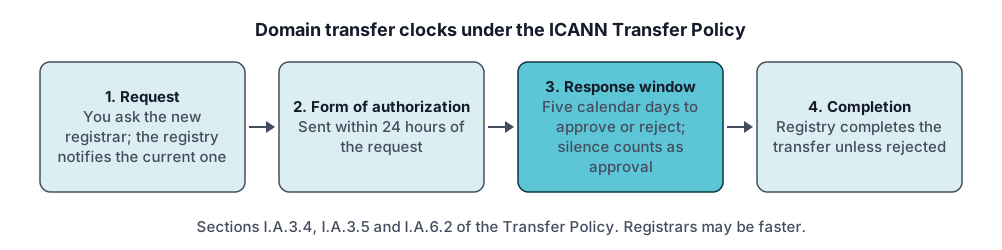
The policy sets a few specific clocks. Registries and registrars differ in how they run the steps, so check your registrar.
- Authorization. The current registrar (the registrar of record) must send you the form of authorization no later than 24 hours after receiving the transfer request from the registry (section I.A.3.4).
- Response window. The current registrar has five calendar days to approve or reject. No response counts as approval (section I.A.3.5).
- Completion. The registry completes the transfer unless it receives a rejection within five calendar days (section I.A.6.2).
- Undo window. A completed transfer can be reversed within five days of qualifying notice, or fourteen days for a registry dispute decision (section I.A.6.4).
How can you speed it up?
You cannot shorten the policy’s five-day ceiling, but you can avoid adding delays and trigger early approval.
- Remove the transfer lock before you start.
- Request a fresh authorization code and enter it exactly, without trailing spaces.
- Approve the transfer in the email or account of the current registrar. Cloudflare’s guide says approving there speeds up the process.
- Keep the contact email on the domain working, because approval requests go to it.
What delays a transfer?
Almost every delay comes from the domain, not the new registrar. Cloudflare’s troubleshooting page lists the causes:
- The domain is still locked. Allow up to five hours for removal to propagate, or up to 24 at some registrars.
- DNSSEC is active and not yet removed.
- The code is invalid or expired.
- The previous registrar rejected the request or a registrar-wide setting blocks transfers.
- A restricted status, such as
clientHold,serverHold,redemptionPeriodorpendingDelete. - The domain was registered or transferred in the last 60 days.
- A recently expired domain: Cloudflare advises waiting at least 45 days after the original expiration date so the registry adds the extra year.
You can see a domain’s statuses and dates with the WHOIS and RDAP lookup tool.
What happens to DNS and email during the transfer?
Nothing changes if you leave DNS alone. A registrar transfer does not change where your records are published. Our DNS records guide explains what you should copy beforehand. Do not switch nameservers mid-transfer unless the new registrar’s guide requires it.
How do you check the status?
Check the transfer in the new registrar’s account first, then look at the domain’s public record. A pendingTransfer status in the record means a request has been received and is being processed, according to ICANN’s status-code page. If you did not ask for it, contact your registrar immediately to deny it. After completion the record shows the new registrar. For one worked destination, see transferring a domain to Cloudflare.
Frequently asked questions
Can I cancel a domain transfer?
Usually yes, while it is still pending. The current registrar can reject a transfer, and ICANN's status-code page says that if you did not request a transfer showing as pendingTransfer you should contact your registrar right away to deny it. Cloudflare's documentation also describes cancelling and retrying a transfer from its dashboard. Ask your registrar how to cancel before it completes.
Is there downtime during a domain transfer?
A registrar transfer moves the registration, not the DNS records, so the website and email should keep working if the nameservers and records stay unchanged. Downtime usually comes from changing nameservers or DNSSEC at the same time. Copy your records first, change nothing else during the transfer, and check the records again afterward.
Why is my domain transfer stuck?
Common causes are a lock still on, an invalid or expired authorization code, an unapproved request, a restricted status such as clientHold or redemptionPeriod, or a registration within 60 days of creation. Cloudflare's troubleshooting page lists these and says to approve the request promptly at the current registrar and contact them if it stalls past the usual time.
Do all extensions transfer in the same time?
No. The ICANN Transfer Policy covers generic extensions such as .com, and its five-calendar-day windows apply there. Country-code extensions follow their own registry rules. Cloudflare's documentation says some, such as .mx, can take up to ten business days and that .uk uses a tag change instead of an authorization code. Check the rules for your extension.
Can I speed up a domain transfer?
Yes. Approve the transfer at your current registrar as soon as the email arrives, because approval ends the waiting period early. Make sure the lock is off, enter a fresh authorization code, and keep your contact email working. Cloudflare's documentation notes that approving at the current registrar speeds up the process.
Sources and further reading
- ICANN Transfer Policy (updated 21 February 2024) (icann.org)
- ICANN EPP status codes: what they mean (icann.org)
- Cloudflare Registrar: transfer a domain to Cloudflare (developers.cloudflare.com)
- Cloudflare Registrar: troubleshoot failed domain transfers (developers.cloudflare.com)
You might also like
- How to Transfer a Domain Name
How a registrar-to-registrar domain transfer works: the 60-day rules, unlocking, the authorization code, approval and what to check afterward.
- Transfer a Domain to Cloudflare Registrar
Steps to transfer a domain to Cloudflare Registrar from GoDaddy or any other registrar: prerequisites, DNSSEC, unlock, auth code, timing.