The whois Command: Linux, macOS, Windows
- Written by ZonWhois Editorial Team
- Reviewed by ZonWhois Editorial Team
- Last checked
- Published on
- In Whois And Rdap Lookup
The whois command is a command-line client that sends a query to a WHOIS server on TCP port 43 and prints the plain-text reply. Run it as whois example.com. Output differs by top-level domain because the protocol defines no structure, and many gTLD records are redacted. For structured results, query an RDAP server over HTTPS instead.

Section of: WHOIS Domain Lookup Explained
The whois command looks up a domain or IP address from a terminal. This page shows how to run it, how to read what comes back, and how to get structured data instead. It builds on the WHOIS guide; for a browser version, use the lookup tool.
What the whois command does
The whois command opens a connection to a WHOIS server on TCP port 43, sends your query and prints the text it gets back. That is the protocol in RFC 3912: a text query ending in a carriage return and line feed, a text reply, then the server closes the connection. The command does not interpret the reply. What you see is whatever the server sent.
Install and run it
Basic use is the same everywhere:
whois example.com- Linux and macOS: try the command first. If the shell says it is not found, install a whois client with your system’s package manager, then run the command again.
- Windows: Microsoft publishes Whois in Sysinternals. It runs on Windows Vista and higher, and its syntax is
whois [-v] domainname [whois.server]. The-voption prints information for referrals. The domain argument can be a DNS name or an IP address. - No install: use the browser tool, which asks RDAP servers from your browser.
This site shows commands but does not run them for you against any host.
Read the output
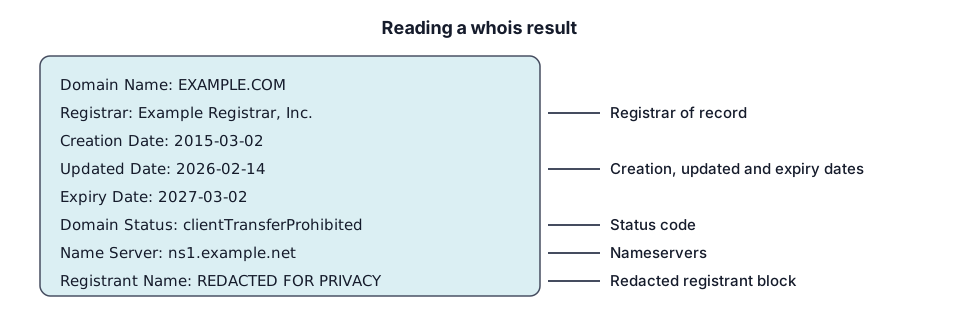
Look for the same fields as in any record: registrar, creation, updated and expiry dates, status codes and nameservers, plus abuse contact details. The WHOIS guide explains each field and the status codes.
Why output differs by TLD
RFC 3912 defines no structured format and no way to declare a character set, so each registry decides its own layout. The same field may be labelled differently from one TLD to the next, and country-code registries may show less or more than generic ones. For generic TLDs, ICANN’s Registration Data Policy also makes many registrant fields appear as redaction notices. See WHOIS privacy.
ICANN states that as of 28 January 2025, registries and registrars are no longer required to provide WHOIS services except for .com, .name and .post. So a command that works for a .com may return nothing useful for another top-level domain, and that is when RDAP is the better tool.
RDAP from the command line
RDAP uses HTTPS, so any tool that fetches a URL works. The RDAP.org bootstrap service redirects https://rdap.org/domain/example.com to the authoritative server. With curl, ask it to follow redirects:
curl -L https://rdap.org/domain/example.comThe reply is JSON as defined in RFC 9083, with an events array that includes registration, last changed and expiration. RDAP.org limits clients to 10 requests per 10 seconds, and its operators suggest heavy users consume the IANA bootstrap registries directly. Do not run bulk lookups through it. The same pattern works for IPs with /ip/ and AS numbers with /autnum/; see IP address WHOIS and RDAP.
Alternatives: the browser tool
If the command is missing, blocked by a firewall on port 43 or unhelpful for a given TLD, use the ZonWhois lookup tool. For protocol background see WHOIS vs RDAP, and for the DNS side of a domain see DNS records explained.
Record check: claims compared with the cited ICANN, IANA and IETF documents on 2026-11-17.
Frequently asked questions
Is whois installed by default?
It depends on the system, and a client is not guaranteed to be present. Run whois example.com; if the shell reports that the command is not found, install the client with your system's package manager. On Windows, download a tool or use a browser lookup instead.
Why does whois show no owner?
Because the registrant details are usually redacted. ICANN's Registration Data Policy requires fields such as registrant name, street, postal code and phone to be redacted where required, and the output must say so. What you still see is the registrar, dates, status and an abuse contact. A relay email or web form is provided if you need to reach the owner.
What port does WHOIS use?
WHOIS uses TCP port 43. RFC 3912 states that a WHOIS server listens on port 43 for requests from clients, which send a text query and receive a text reply before the server closes the connection. RDAP, by contrast, uses ordinary HTTP-based requests, so a firewall that blocks port 43 does not affect it.
Can I use whois on Windows?
Yes. Microsoft publishes Whois in its Sysinternals suite, a small download that runs on Windows Vista and higher, with the syntax whois [-v] domainname [whois.server]. You can also use a browser-based tool such as the ZonWhois lookup, which needs no installation, or call an RDAP server with a tool like curl where it is available.
Should I use whois or RDAP in scripts?
Prefer RDAP. WHOIS text has no defined structure, so every registry formats it differently and parsing is fragile. RDAP returns JSON with defined fields, and ICANN says it was created as the replacement for WHOIS. If you query rdap.org, remember its limit of 10 requests per 10 seconds; heavy users should read the IANA bootstrap data directly.
Sources and further reading
- RFC 3912: WHOIS Protocol Specification (rfc-editor.org)
- RFC 9083: JSON Responses for RDAP (rfc-editor.org)
- RDAP.org: about the bootstrap service (about.rdap.org)
- Microsoft Learn: Whois (Sysinternals) (learn.microsoft.com)
- ICANN: Registration Data Access Protocol (RDAP) (icann.org)
You might also like
- WHOIS Domain Lookup Explained
What WHOIS and RDAP are, what a domain record shows, why owner details are often redacted, and how to read registrar, dates and status codes.
- Domain Owner Lookup: Who Owns a Domain
How to find who owns a domain name with an RDAP or WHOIS lookup, what to do when the owner is hidden, and how to reach them or report abuse.
- ICANN WHOIS Lookup: WHOIS vs RDAP
How the ICANN lookup relates to WHOIS and RDAP, why RDAP replaced port-43 WHOIS for gTLDs, and how lookup tools differ in what they show.
- IP Address WHOIS: ARIN, RIPE and RDAP
How an IP address WHOIS or RDAP lookup works, what the five regional internet registries publish, and what the result can and cannot tell you.
- WHOIS Privacy: What It Is and Whether You Need It
What WHOIS privacy hides, how redaction after GDPR differs from a paid privacy service, what stays public, and what to check at your registrar.