DNS AAAA Record: IPv6 Explained
- Written by ZonWhois Editorial Team
- Published on
- In Dns Records
A DNS AAAA record maps a domain name to a 128-bit IPv6 address, the way an A record maps a name to a 32-bit IPv4 address. It is a separate record type with IANA type number 28, so a name can have both A and AAAA records. A client that supports IPv6 asks for the AAAA record when it needs the address.

Section of: DNS Records Explained: Types and Examples
An AAAA record is the IPv6 counterpart of the A record, and one of the types in DNS records explained. RFC 3596 defines it.
What an AAAA record is
An AAAA record holds a 128-bit IPv6 address for a name. RFC 3596 assigns the type value 28 and says the address is encoded in the record’s data in network byte order, high-order byte first.
IPv6 address format in a record
In a zone file you write the address in hexadecimal groups separated by colons:
example.com. 3600 IN AAAA 2001:db8::10The address shown is a placeholder for illustration. Cloudflare says it stores AAAA addresses in canonical notation, so the address you see after saving may be written in a shorter form than the one you typed.
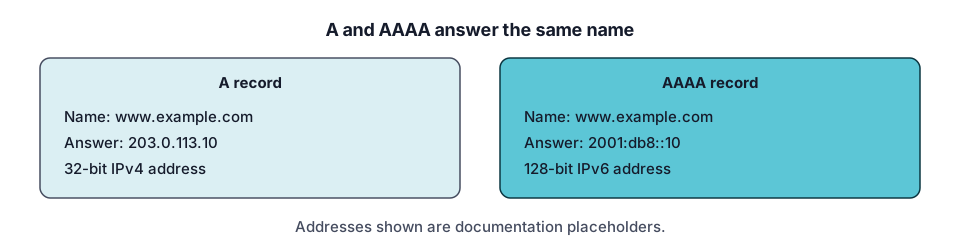
AAAA vs A
| A | AAAA | |
|---|---|---|
| Address family | IPv4 | IPv6 |
| Size | 32 bits | 128 bits |
| Type value | 1 | 28 |
The A type’s 4-octet data comes from RFC 1035; the AAAA type value and size come from RFC 3596.
When you need one (dual stack)
If a service is reachable over both address families, publish both records on the same name. RFC 8499 defines a record set by label, class and type, so the A and AAAA records are separate sets and do not conflict. Publish an AAAA record only when the address truly works.
Add and test an AAAA record
- In your DNS provider’s panel, choose Add record and type AAAA.
- Enter the name, the IPv6 address and the TTL.
- Save, then query it: use the DNS lookup tool and select AAAA.
- Reverse lookups use the ip6.arpa domain; RFC 3596 shows the address 4321:0:1:2:3:4:567:89ab written out as reversed nibbles under ip6.arpa. See reverse DNS and PTR records.
Troubleshooting
- Page fails only on IPv6. The AAAA record may point at an address that is not serving. Fix the address or remove the record.
- Address looks different after saving. Providers may display a canonical form; the value is the same.
- Old answer still showing. The previous record stays cached until its TTL expires.
For how names resolve to addresses in general, return to DNS records explained or read about the CNAME record.
A short checklist before you add or change an AAAA record
- Write down the current records for the name (use the DNS lookup tool) so you can put them back if something breaks.
- Confirm with whoever runs the server that it actually answers on the IPv6 address you are about to publish.
- Add the record, then test the name from a network that has IPv6 and from one that does not, so you see both paths.
- Keep the old record in your notes until you have seen the new answer in a fresh lookup.
Common mistakes: pasting an IPv4 address into an AAAA field, publishing an address that the server is not listening on, and forgetting that a typo in a long hexadecimal address is easy to miss. Read the address back from the saved record rather than from your clipboard.
Questions to ask your DNS or hosting contact: is the server reachable over IPv6, which exact address should the name use, and does anything else (a firewall or proxy) need the same change?
Frequently asked questions
Do I need an AAAA record?
Only if the server at that name is reachable over IPv6 and you want clients to use it. The A record already covers IPv4 clients. Add an AAAA record when you have a working IPv6 address for the same service, and test it afterwards, because a wrong AAAA record can send IPv6 clients to an address that does not answer.
What does AAAA stand for?
The name reflects size: an IPv6 address is 128 bits, four times the 32 bits of an IPv4 address held in an A record, so the record is called AAAA. It is not an abbreviation of words. RFC 3596 assigns it the IANA type value 28.
Can I have A and AAAA records together?
Yes. They are different record types, so a single name can hold both. RFC 8499 defines a record set as records with the same label, class and type, so A records form one set and AAAA records another. Clients that support both can choose either, depending on their network connection.
How do I test IPv6?
Query the AAAA record for the name with the DNS lookup tool or a command such as dig AAAA example.com, then open the site over a connection that has IPv6. Confirm the address in the answer is the one you entered. If the lookup works but the page does not load, the problem is with the server, not DNS.
Where do AAAA records appear in reverse lookups?
They do not. A reverse lookup uses a PTR record under the ip6.arpa domain, where RFC 3596 writes the address as reversed hexadecimal nibbles. The AAAA record maps name to address, and the PTR maps address to name. The two are separate records, managed in different zones, so each must be set up on its own.
Sources and further reading
- RFC 3596: DNS extensions to support IP version 6 (rfc-editor.org)
- RFC 1035: Domain names, implementation and specification (rfc-editor.org)
- RFC 8499: DNS terminology (rfc-editor.org)
- Cloudflare: DNS record types (developers.cloudflare.com)
You might also like
- DNS Records Explained: Types and Examples
What DNS records are, how a lookup finds them, and what A, AAAA, CNAME, MX, TXT, NS and SOA records do, with examples and common mistakes.
- DNS A Record Explained
A DNS A record maps a name to an IPv4 address. See its fields, example records, how multiple A records behave, TTL, and how to troubleshoot.
- DNS CNAME Record Explained
A DNS CNAME record makes one name an alias of another. Learn the rules, why it cannot sit at the root, CNAME vs A record, and how to fix conflicts.
- DNS MX Record Explained
A DNS MX record names the mail exchange for a domain and a priority number. Learn how lower values win, why MX cannot be an IP, and null MX.
- DNS TXT Record Explained
A DNS TXT record stores text for a name. Learn the format, string length rules, SPF, DKIM and DMARC syntax pointers, and how to add and check one.
- Reverse DNS Lookup and PTR Records
Reverse DNS maps an IP address back to a name using PTR records under in-addr.arpa and ip6.arpa. Learn how it works, how to look one up, who controls it.