Reverse DNS Lookup and PTR Records
- Written by ZonWhois Editorial Team
- Published on
- In Dns Records
Reverse DNS lookup finds the name that belongs to an IP address. It uses PTR records stored under the special in-addr.arpa domain for IPv4 and ip6.arpa for IPv6, with the address written backwards. Because the reverse tree follows address blocks, the PTR is usually controlled by whoever the address range is delegated to, not by the domain owner.

Section of: DNS Records Explained: Types and Examples
Reverse DNS goes from an address to a name, the opposite of the A record lookup. RFC 8499 describes the process of mapping an address to a name as a reverse lookup. It is one of the topics in DNS records explained.
What reverse DNS is
A forward lookup asks which address a name has. A reverse lookup asks which name an address has. The answer is a PTR record, which holds a host name.
How PTR records work (in-addr.arpa and ip6.arpa)
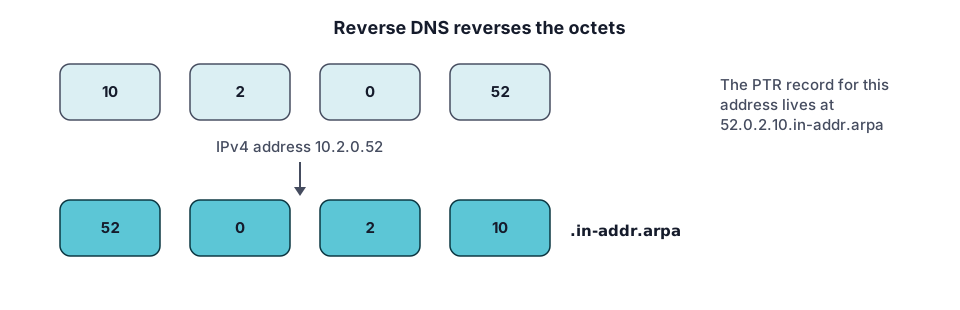
For IPv4, RFC 1035 reverses the octets under IN-ADDR.ARPA: data for 10.2.0.52 is located at 52.0.2.10.IN-ADDR.ARPA. For IPv6, RFC 3596 writes the address as hexadecimal nibbles in reverse order under IP6.ARPA, and its example is 4321:0:1:2:3:4:567:89ab becoming b.a.9.8.7.6.5.0.4.0.0.0.3.0.0.0.2.0.0.0.1.0.0.0.0.0.0.0.1.2.3.4.IP6.ARPA. See also AAAA records.
52.0.2.10.in-addr.arpa. 3600 IN PTR host.example.com.Look up a PTR record (tool and commands)
- Use the DNS lookup tool with the PTR type and the reversed name.
- On Linux and macOS:
dig -x 10.2.0.52 - On Windows:
nslookup 10.2.0.52
The address is the one from the RFC example, used for illustration.
Who controls the PTR (the IP block holder)
The reverse tree is organised by address, not by domain. RFC 2317 explains that a reverse zone is normally delegated on /24 boundaries and describes a method for delegating blocks of fewer than 256 addresses, which is why small holders can still get control. Cloudflare says PTR records should preferably be added to reverse zones. In practice, ask whoever assigned you the address range; to see which registry holds a range, read IP address WHOIS and RDAP.
Why mail servers care (explain, no setup)
Some receiving systems compare the reverse and forward results for a connecting address. The DNS protocol itself treats the two as separate trees, so a mismatch is a configuration difference, not a protocol error. This page does not cover mail setup.
Common errors
- No PTR found. The reverse zone may not be delegated to you, or no PTR was created.
- Mismatch with forward DNS. The A record and the PTR are maintained separately.
- Reversed wrongly. Reverse every octet for IPv4 and every nibble for IPv6.
- Editing the wrong zone. A PTR belongs in the reverse zone, not the domain’s forward zone.
A short checklist when a reverse lookup does not work
- Confirm which address you are asking about and who holds the block it belongs to; the IP address WHOIS guide shows how to find the holder.
- Run the lookup with the DNS lookup tool or
dig -xand note exactly what comes back, including an empty answer. - Check the forward record for the name in the answer: does the A record lead back to the same address?
- If the PTR is missing or wrong, the change is made by whoever controls that reverse zone, not in your domain’s own zone.
Questions to ask the block holder: can you set a PTR for this address, what host name should it use, and how long should I wait before testing again?
Frequently asked questions
What is a PTR record?
A PTR record is a DNS record that points from a name in the reverse tree to a host name. The name is the IP address written backwards under in-addr.arpa for IPv4, or as reversed nibbles under ip6.arpa for IPv6. A reverse lookup queries it to find the name associated with an address.
Can I set my own reverse DNS?
Only if the reverse zone for your address is delegated to a server you can edit. The reverse tree follows address blocks, so the delegation sits with whoever holds the range, often your network provider. Ask them whether they offer a PTR editing option for your address. Adding a PTR in your own forward zone does not change it.
Why does reverse DNS not match forward DNS?
Forward and reverse lookups use separate parts of the DNS tree, managed by different parties. The A record for a name lives in the domain's zone, while the PTR for its address lives under in-addr.arpa. Nothing in the protocol forces the two to agree, so they match only if both owners set them to.
How do I do a reverse lookup on Windows?
Open a command prompt and run nslookup followed by the IP address. It sends a PTR query and prints the name it finds, or a message that it could not find one. On Linux or macOS, dig -x followed by the address does the same job. Use a real address you want to check, not a placeholder.
Do IPv6 addresses have PTR records too?
Yes. RFC 3596 defines the ip6.arpa domain for IPv6 reverse lookups, with the address written as hexadecimal nibbles in reverse order, separated by dots. The record type is still PTR. Because each nibble is its own label, IPv6 reverse names are long, which is why lookup tools usually build the name for you.
Sources and further reading
- RFC 1035: Domain names, implementation and specification (rfc-editor.org)
- RFC 3596: DNS extensions to support IP version 6 (rfc-editor.org)
- RFC 2317: Classless IN-ADDR.ARPA delegation (rfc-editor.org)
- RFC 8499: DNS terminology (rfc-editor.org)
- Cloudflare: DNS record types (developers.cloudflare.com)
You might also like
- DNS Records Explained: Types and Examples
What DNS records are, how a lookup finds them, and what A, AAAA, CNAME, MX, TXT, NS and SOA records do, with examples and common mistakes.
- DNS A Record Explained
A DNS A record maps a name to an IPv4 address. See its fields, example records, how multiple A records behave, TTL, and how to troubleshoot.
- DNS AAAA Record: IPv6 Explained
A DNS AAAA record maps a name to an IPv6 address. See the format, how it differs from an A record, when to add one, and how to test it.
- DNS CNAME Record Explained
A DNS CNAME record makes one name an alias of another. Learn the rules, why it cannot sit at the root, CNAME vs A record, and how to fix conflicts.
- DNS MX Record Explained
A DNS MX record names the mail exchange for a domain and a priority number. Learn how lower values win, why MX cannot be an IP, and null MX.
- DNS TXT Record Explained
A DNS TXT record stores text for a name. Learn the format, string length rules, SPF, DKIM and DMARC syntax pointers, and how to add and check one.