DNS MX Record Explained
- Written by ZonWhois Editorial Team
- Published on
- In Dns Records
A DNS MX record tells other mail systems which host accepts email for a domain. Each MX record holds a preference number and a host name, and senders try the lowest number first. The target must be a name with address records, not an alias or a bare IP address. A null MX says the domain accepts no mail.

Section of: DNS Records Explained: Types and Examples
An MX record says where email for a domain should be delivered. It is one of the types in DNS records explained. This page covers the record’s syntax and rules only, not mailbox providers.
What an MX record does
When a mail server has a message for someone@example.com, it looks up the domain’s MX records and connects to a listed host. Cloudflare’s reference page says an MX record is required to deliver email to a mail server.
Priority and fallback (lower number first)
RFC 1035 defines the preference as a 16-bit integer where lower values are preferred. RFC 5321 section 5.1 says lower numbers are more preferred and that senders must randomise hosts sharing a preference to spread the load.
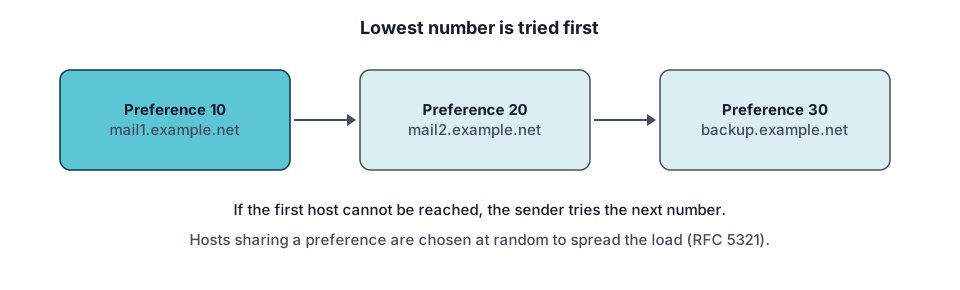
Example
example.com.  3600  IN  MX  10  mail1.example.com.
example.com.  3600  IN  MX  20  mail2.example.com.
mail1.example.com.  3600  IN  A  203.0.113.20
Senders try mail1 first, then mail2. If no MX exists at all, RFC 5321 treats the domain’s address record as an implicit MX with preference 0.
MX must point to a name, not an IP
RFC 2181 section 10.3 says the name in an MX record must not be an alias and must have one or more address records. So create an A record (or AAAA) for the host, then point the MX at that name. Do not point it at a CNAME.
Null MX for domains that do not receive mail
RFC 7505 defines the null MX: preference 0 and a zero-length exchange written as a dot. It signals that the domain accepts no mail, so senders fail immediately. A domain that advertises a null MX must not advertise any other MX record.
example.com. 3600 IN MX 0 .Check MX records (tool)
Select MX in the DNS lookup tool to see the records and their preferences. Mail-related text records are in TXT records.
Troubleshooting
- Mail goes to the wrong host. Check the lowest preference value.
- Provider rejects the record. The target may be an IP address or an alias.
- Old host still receiving. Caches keep the previous MX until its TTL expires.
- Domain should accept no mail. Publish a null MX and remove other MX records.
A short checklist before you change MX records
- Copy the existing MX records somewhere safe first. A wrong change can stop mail from arriving, and the old values are your way back.
- Get the exact host names from whoever runs your mail, rather than guessing them.
- Make sure each host name has an address record, then add the MX records with the preference numbers your provider gives.
- After saving, look the domain up with the DNS lookup tool and send a test message from an outside account.
Common mistakes: typing an IP address where a host name belongs, removing the old records before the new ones are confirmed, and forgetting to check that mail still arrives after the change.
Questions to ask your mail provider: which hosts should receive mail for the domain, should the records be added in a particular order, and is there anything else (such as text records) that must change at the same time? This site does not recommend providers.
Frequently asked questions
What does MX priority mean?
The number in an MX record is its preference, and lower values are preferred. A sender tries the host with the lowest number first and falls back to higher numbers if it cannot connect. RFC 5321 says equal numbers are randomised to spread the load. The numbers only need to be in the right order, not consecutive.
Can I have multiple MX records?
Yes. A domain can publish several MX records with different preferences for fallback, or equal preferences to share load. RFC 5321 says senders must randomise destinations that share a preference. The one exception is a null MX, which must be the only MX record for the domain.
Can MX point to an IP address?
No. The data of an MX record is a domain name, and RFC 2181 says that name must not be an alias and must have one or more address records. Create an A or AAAA record for the mail host name, then point the MX at that name.
Do I need MX if I only send mail?
MX records control where mail addressed to your domain is delivered. If you only send, you do not need one for sending, but replies and bounces to your domain would have nowhere to go. If the domain should accept nothing, publish a null MX so senders fail immediately, as RFC 7505 describes.
Can an MX target be a CNAME?
No. RFC 2181 section 10.3 says the name used as part of an MX value must not be an alias and must have one or more address records. Some mail software follows aliases anyway, but you cannot rely on it. Point the MX at a name that has its own A or AAAA record, and keep any CNAME elsewhere.
Sources and further reading
- RFC 1035: Domain names, implementation and specification (rfc-editor.org)
- RFC 5321: Simple Mail Transfer Protocol (rfc-editor.org)
- RFC 2181: Clarifications to the DNS specification (rfc-editor.org)
- RFC 7505: A null MX no service resource record (rfc-editor.org)
- Cloudflare: DNS record types (developers.cloudflare.com)
You might also like
- DNS Records Explained: Types and Examples
What DNS records are, how a lookup finds them, and what A, AAAA, CNAME, MX, TXT, NS and SOA records do, with examples and common mistakes.
- DNS A Record Explained
A DNS A record maps a name to an IPv4 address. See its fields, example records, how multiple A records behave, TTL, and how to troubleshoot.
- DNS AAAA Record: IPv6 Explained
A DNS AAAA record maps a name to an IPv6 address. See the format, how it differs from an A record, when to add one, and how to test it.
- DNS CNAME Record Explained
A DNS CNAME record makes one name an alias of another. Learn the rules, why it cannot sit at the root, CNAME vs A record, and how to fix conflicts.
- DNS TXT Record Explained
A DNS TXT record stores text for a name. Learn the format, string length rules, SPF, DKIM and DMARC syntax pointers, and how to add and check one.
- Reverse DNS Lookup and PTR Records
Reverse DNS maps an IP address back to a name using PTR records under in-addr.arpa and ip6.arpa. Learn how it works, how to look one up, who controls it.