WHOIS Domain Lookup Explained
- Written by ZonWhois Editorial Team
- Reviewed by ZonWhois Editorial Team
- Last checked
- Published on
- In Whois And Rdap Lookup
WHOIS is the long-running system for looking up who registered a domain name and when. Its public record shows the registrar, key dates, status codes and nameservers, but owner details are now often redacted. ICANN describes RDAP, a structured web-based protocol, as the replacement for the original WHOIS protocol, and most lookups today use RDAP behind the scenes.

General information about domain names, not legal, trademark or financial advice. Registrar and registry rules and fees change; confirm with your registrar before you pay or transfer.
A WHOIS lookup answers a simple question about a domain name: who registered it, through which company, and when does it expire. This guide explains what the record contains, why the owner is usually hidden, and how WHOIS differs from RDAP. To run a lookup right now, use the WHOIS lookup tool.
What WHOIS is, and what RDAP replaced
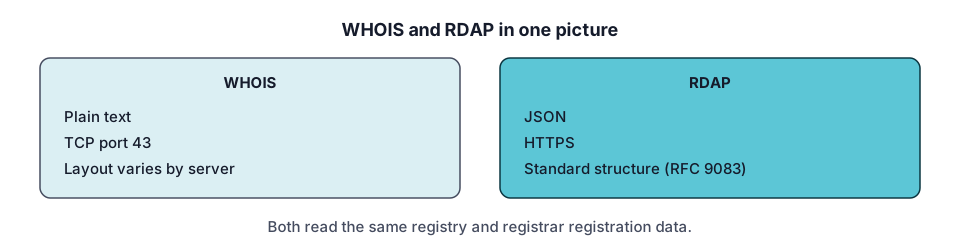
WHOIS is the public directory of domain registration data, and RDAP is the newer protocol that has replaced it. The original WHOIS protocol, specified in RFC 3912 in September 2004, listens on TCP port 43 and answers a text query with human-readable text. The RFC defines no structured response format, so each registry decides what the text looks like.
RDAP, the Registration Data Access Protocol, fixes that. Its responses are JSON documents defined in RFC 9083 (June 2021), and its queries are ordinary HTTPS requests defined in RFC 9082. ICANN lists internationalization support, secure access to data and the ability to find authoritative servers as benefits. Since 28 January 2025, registries and registrars have not been required to provide WHOIS services, except for .com, .name and .post.
In everyday speech “WHOIS” now means any domain lookup. The WHOIS vs RDAP comparison covers the protocol difference in detail.
What a WHOIS or RDAP record contains
A record is a short list of facts about one domain. The exact layout varies, but these are the fields you will meet most often.
| Field | What it tells you |
|---|---|
| Domain name | The name you looked up, in lowercase |
| Registrar | The accredited company that manages the registration |
| Creation date | When the domain was first registered |
| Updated date | When the record last changed |
| Expiry date | When the current registration term ends |
| Status codes | Locks and states, such as transfer prohibited |
| Nameservers | The servers that answer DNS questions for the domain |
| Registrant | The holder of the name, often redacted |
| Abuse contact | Where to report misuse, published by the registrar |
In RDAP, dates are expressed as events (registration, last changed, expiration), and each object has a status array. Both are defined in RFC 9083.
How to look up a domain
Type the domain into a lookup tool and read the result. The ZonWhois lookup tool runs in your browser and asks RDAP servers directly, so nothing about your search is stored on this site. The lookup is routed in two steps. First, the client finds out which server is authoritative for the top-level domain, using the registry that IANA publishes for RDAP. Then it asks that server about the domain.
If you prefer the command line, see the whois command guide. For IP addresses rather than domains, see IP address WHOIS and RDAP.
Why most records are redacted now
Registrant details are hidden because data-protection law and ICANN policy require it in many cases. The GDPR was adopted by the EU on 14 April 2016 and took effect on 25 May 2018. ICANN has since worked on policies that balance individual privacy against security needs.
ICANN’s Registration Data Policy, effective 21 August 2025, sets the current rules. Redaction means the value is left out of the output and the output indicates that it has been redacted. Fields that must be redacted where required include registrant name, street, postal code and phone. Registry operators also redact registrant and technical email addresses. The registrar must still publish an email address or a link to a web form that lets someone contact the registrant without revealing their identity.
Some data stays public: the domain name, registrar, creation date, domain status, registrar abuse contact and the registrant’s country. The full story, including private registration services, is in WHOIS privacy: what it is and whether you need it.
Registrar, registry and registrant: who is who
Three different parties appear around every domain, and mixing them up is the most common mistake when reading a record.
- Registry: the organization that runs a top-level domain, such as the operator of .com. IANA’s Root Zone Database lists the manager for each TLD.
- Registrar: the accredited company the registrant buys the name from and manages it through.
- Registrant: the person or organization that holds the registration.
When a page says “WHOIS lookup by owner”, it means the registrant. When you need to report abuse, use the registrar’s abuse contact. When you want to move a name, you work with the registrar; the transfer guide explains the steps.
EPP status codes in plain English
Status codes describe locks and states, and ICANN publishes a plain-language list. A few you will see often:
- ok: no pending operations or prohibitions.
- clientTransferProhibited: the registry rejects requests to move the domain to another registrar, guarding against unauthorized transfers.
- clientUpdateProhibited and clientDeleteProhibited: updates or deletion are rejected until the registrar removes the status.
- clientHold and serverHold: the domain is kept out of DNS, so it does not resolve.
- redemptionPeriod: the registrar has requested deletion, and per ICANN the domain is held for 30 days during which it can be restored through the registrar.
- pendingDelete: the redemption period passed without restoration, and the name will be purged after several days and then become available.
A transfer lock is normal, not a warning sign. A hold or a redemption status is worth acting on: read the expired domains guide and how to check when a domain expires.
WHOIS vs RDAP vs the ICANN lookup
These three terms describe different things. WHOIS and RDAP are protocols. A lookup is a tool that uses a protocol. ICANN offers its own web lookup, registrars offer theirs, and this site offers a lookup tool that queries RDAP from your browser. The data is the same registration data; the presentation differs. See ICANN WHOIS lookup: WHOIS vs RDAP for how they compare.
What WHOIS cannot tell you
A lookup shows what was recorded, not what is true about the person behind a website. It cannot confirm legal ownership, identify an individual behind a redacted record, show a site’s hosting or traffic, or explain why a name is not available. ICANN also runs a Registration Data Request Service for nonpublic gTLD data, which provides a standard format for submitting requests but does not promise disclosure on its own.
Common mistakes when reading a record
- Treating a redacted field as proof that the owner is hiding something. Redaction is the default for many records.
- Confusing the registrar with the host. The registrar manages the registration; DNS and websites can sit anywhere.
- Reading an old cached copy. Always look at the updated date.
- Assuming ccTLDs follow ICANN’s gTLD rules. Country-code registries set their own policies, so their output differs.
- Reading a transfer lock as a problem when it is a normal protection.
To find the contact path for a specific name, continue with domain owner lookup. To understand the DNS side of a domain, start with DNS records explained. If you are about to buy a name, see how to register a domain name.
Record check: claims compared with the cited ICANN, IANA and IETF documents on 2026-11-17.
All Whois And Rdap Lookup guides
- Domain Owner Lookup: Who Owns a Domain
How to find who owns a domain name with an RDAP or WHOIS lookup, what to do when the owner is hidden, and how to reach them or report abuse.
- ICANN WHOIS Lookup: WHOIS vs RDAP
How the ICANN lookup relates to WHOIS and RDAP, why RDAP replaced port-43 WHOIS for gTLDs, and how lookup tools differ in what they show.
- IP Address WHOIS: ARIN, RIPE and RDAP
How an IP address WHOIS or RDAP lookup works, what the five regional internet registries publish, and what the result can and cannot tell you.
- The whois Command: Linux, macOS, Windows
How to run the whois command on Linux, macOS and Windows, read its output, and use RDAP from the command line when WHOIS shows too little.
- WHOIS Privacy: What It Is and Whether You Need It
What WHOIS privacy hides, how redaction after GDPR differs from a paid privacy service, what stays public, and what to check at your registrar.
Frequently asked questions
What is WHOIS?
WHOIS is the system and original query protocol for looking up registration data about a domain name, such as the registrar, creation and expiry dates, status and nameservers. The protocol itself is defined in RFC 3912 and works over TCP port 43, returning plain text. People also use the word for any domain lookup, including modern RDAP lookups that no longer use that protocol.
Is WHOIS still used?
Yes, but mostly as a name for the activity rather than the protocol. ICANN says RDAP was created as the replacement for the WHOIS protocol, and since 28 January 2025 registries and registrars have not been required to offer WHOIS services except for .com, .name and .post. Most lookup websites query RDAP and show the result in a familiar WHOIS-style layout.
How do I look up who owns a domain?
Run the domain through a WHOIS or RDAP lookup and read the registrar, dates and status. The registrant's name and contact details are frequently redacted, so you may only get a relay email address or web form. The guide on domain owner lookup walks through each step, including how to reach a hidden owner and when to contact the registrar's abuse team instead.
Is WHOIS data accurate?
It is whatever the registrant supplied to the registrar, so accuracy varies and a lookup cannot prove legal ownership. Dates, registrar and status come from the registry and registrar systems and are generally reliable for those fields. Treat contact details with caution, and remember that a redacted or privacy-protected record tells you nothing about the real person behind it.
Can I hide my WHOIS information?
Largely yes. Under ICANN's Registration Data Policy, many registrant fields must be redacted where required, and many registrars also offer a privacy or proxy service. Some data always stays public, including the registrar, creation date, domain status and an abuse contact. Whether a particular top-level domain allows privacy depends on that registry's rules, so check with your registrar.
What is the difference between WHOIS and RDAP?
WHOIS returns unstructured plain text over port 43 with no standard layout, so every registry formats it differently. RDAP uses ordinary HTTPS and returns structured JSON with defined fields, supports internationalization and can point clients to the authoritative server. ICANN describes RDAP as the replacement for WHOIS, and the two are covered side by side in the ICANN lookup guide.
Sources and further reading
- ICANN: Registration Data Access Protocol (RDAP) (icann.org)
- ICANN: Registration Data Policy (icann.org)
- ICANN: EPP status codes (icann.org)
- ICANN: Data protection and privacy (icann.org)
- RFC 3912: WHOIS Protocol Specification (rfc-editor.org)
- RFC 9083: JSON Responses for RDAP (rfc-editor.org)
- IANA: Bootstrap Service Registry for Domain Name Space (iana.org)
You might also like
- Domain Owner Lookup: Who Owns a Domain
How to find who owns a domain name with an RDAP or WHOIS lookup, what to do when the owner is hidden, and how to reach them or report abuse.
- ICANN WHOIS Lookup: WHOIS vs RDAP
How the ICANN lookup relates to WHOIS and RDAP, why RDAP replaced port-43 WHOIS for gTLDs, and how lookup tools differ in what they show.
- IP Address WHOIS: ARIN, RIPE and RDAP
How an IP address WHOIS or RDAP lookup works, what the five regional internet registries publish, and what the result can and cannot tell you.
- The whois Command: Linux, macOS, Windows
How to run the whois command on Linux, macOS and Windows, read its output, and use RDAP from the command line when WHOIS shows too little.
- WHOIS Privacy: What It Is and Whether You Need It
What WHOIS privacy hides, how redaction after GDPR differs from a paid privacy service, what stays public, and what to check at your registrar.